The LearnHouse MCP server gives Claude safe access to your organization, so you can create courses, edit lessons and pull learner data from a chat.
14 يومًا مجانًا · بلا بطاقة ائتمان
Claude reaches your LearnHouse academy through the LearnHouse MCP server, added in Claude as a custom connector. After you sign in, Claude can create courses, edit lessons and read learner data, never beyond what your own role allows.
Describe the course and Claude creates the chapters, lessons and quizzes in LearnHouse for you to review.
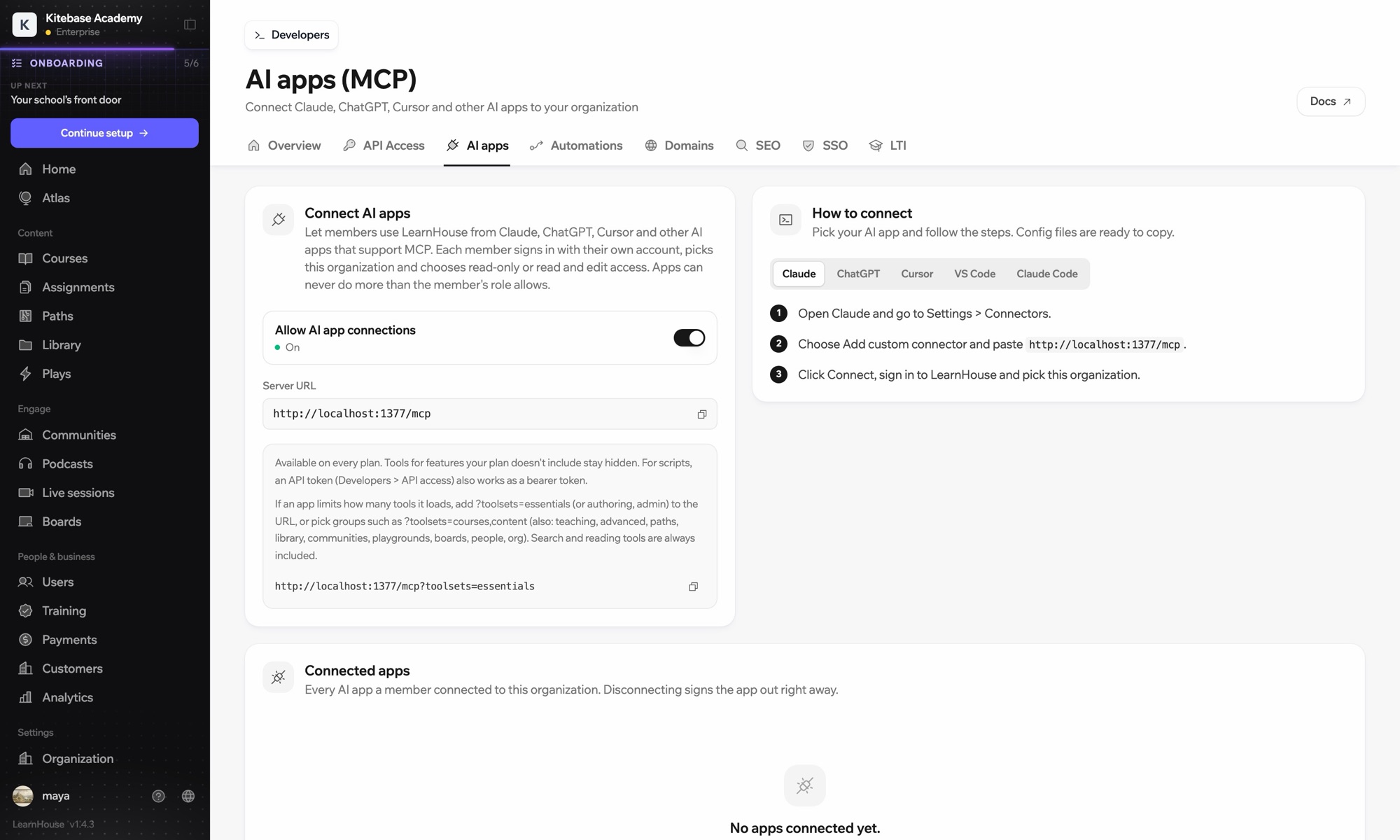
In your LearnHouse dashboard, open Connect AI apps and copy the server URL.
In Claude, go to Settings → Connectors, choose Add custom connector and paste the URL.
Click Connect, sign in to LearnHouse and pick your organization.
Ask Claude to create, edit or look things up. Changes appear in your academy.
مشمول في
The API and MCP server are included from the Pro plan.
Model Context Protocol is an open standard that lets AI assistants like Claude use outside tools. LearnHouse runs an MCP server so Claude can read and change your academy when you ask it to.
Claude only acts when you ask it to in the chat, and only with the access you approved for your account.
Any Claude app that supports custom MCP connectors, including Claude desktop and claude.ai. Claude Code works too.
LearnHouse only sends Claude what it needs to answer your request. Check Anthropic's data settings for how your conversations are handled.
Yes. Each admin connects with their own LearnHouse account, so actions follow their role and permissions.
No. You paste one URL into Claude and sign in.

جرّب أي خطة مجانًا لمدة 14 يومًا. بلا بطاقة ائتمان، وبلا رسوم منصة (0%)، والتكاملات مشمولة.
أو استضِف النسخة مفتوحة المصدر بنفسك مجانًا
