LearnHouse
शुरू करें
LearnHouse
AIएंटरप्राइज़डेवलपर्समोबाइलप्राइसिंग
GitHub...
लॉगिनशुरू करें

आज के दौर का ओपन सोर्स लर्निंग प्लेटफ़ॉर्म

XGitHubLinkedInDiscord

प्रोडक्ट

  • क्रिएटर्स
  • शिक्षा जगत
  • एंटरप्राइज़
  • डेवलपर्स
  • मोबाइल ऐप
  • ओपन सोर्स
  • डिज़ाइन
  • खोज में दिखना
  • प्राइसिंग

फ़ीचर्स

  • कोर्स
  • AI
  • पेमेंट्स
  • कम्युनिटी
  • पॉडकास्ट
  • बोर्ड
  • Plays
  • कोड
  • एनालिटिक्स
  • वीडियो कोर्स
  • न्यूज़लेटर
  • लाइव सेशन
  • लर्निंग पाथ
  • ड्रिप कंटेंट
  • असाइनमेंट
  • सर्टिफ़िकेट
  • सिनेरियो
  • ज़रूरी ट्रेनिंग
  • कोर्स अनुवाद
  • इंटीग्रेशन

संसाधन

  • डॉक्यूमेंटेशन
  • यूनिवर्सिटी
  • ब्लॉग
  • चेंजलॉग
  • सेल्फ़-होस्टिंग
  • शब्दावली
  • GitHub
  • प्लेटफ़ॉर्म की तुलना करें

कंपनी

  • संपर्क
  • सुरक्षा
  • उद्योग

कंपनी

  • संपर्क
  • सुरक्षा
  • उद्योग

LearnHouse की तुलना इनसे करें

  • Udemy
  • Moodle
  • Teachable
  • Open edX
  • Thinkific
  • Canvas
  • Kajabi
  • Skool
  • Podia
  • Coursera
  • सभी तुलनाएं

इनके विकल्प

  • Udemy
  • Teachable
  • Thinkific
  • Kajabi
  • Skool
  • Podia
  • Coursera
  • Moodle
  • Open edX
  • Canvas LMS
  • Skillshare
  • Mighty Networks
  • LearnWorlds
  • Circle
कोई बग या समस्या मिली?
Open Source Initiative

ओपन सोर्स

AGPLv3 लाइसेंस, सेल्फ-होस्ट कर सकते हैं

GDPR के लिए तैयार

EU डेटा प्रोटेक्शन नियमों के अनुरूप

G2

G2

G2 पर हमें रिव्यू करें

© 2026 LearnHouse, Inc.

  • गोपनीयता
  • शर्तें
  • कुकी नीति
सभी इंटीग्रेशन
Webex

Use Webex with LearnHouse: Live Session LinksKeep Webex, give your classes a home

Schedule live sessions in LearnHouse with your Webex link, so reminders, attendance and recordings sit with the course.

मुफ़्त ट्रायल शुरू करें

14 दिन मुफ़्त · क्रेडिट कार्ड नहीं चाहिए

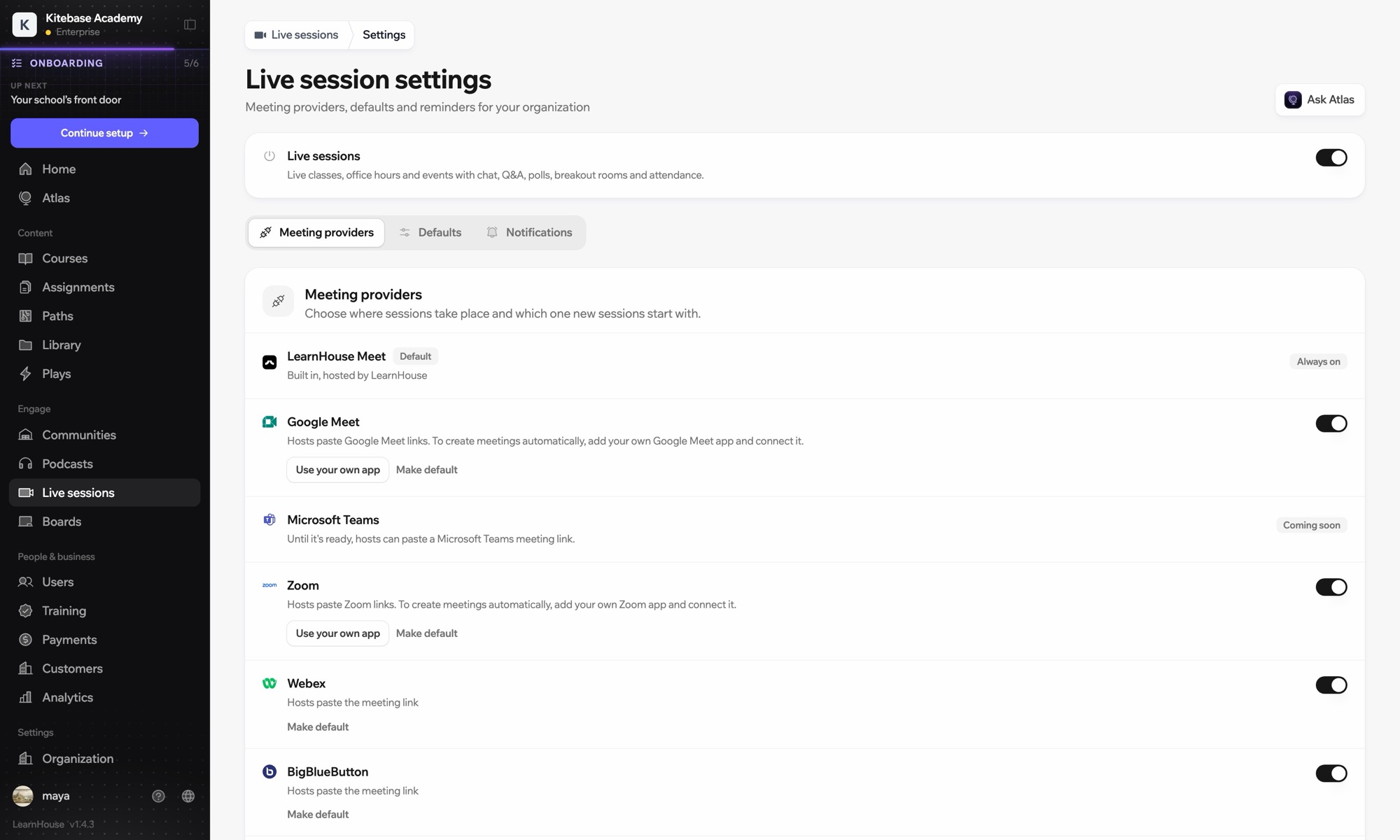
Webex works with LearnHouse live sessions in link mode. The host pastes the Webex link, and LearnHouse provides the session page with reminders, chat, Q&A, polls and attendance around it.

कैसे जुड़ता है
लाइव सेशन प्रोवाइडर
प्लान
Business और ऊपर
संबंधित LearnHouse पेज
लाइव सेशन
Businessलाइव सेशन प्रोवाइडरलाइव क्लासकम्युनिकेशन
आप क्या कर सकते हैं

Webex आपके लिए क्या करता है

लाइव सेशन

Bring your Webex link

Webex works in link mode: paste the meeting link and learners join from the session page.
01 / 3
लाइव सेशन प्रोवाइडर: Zoom, Google Meet, Teams
MC
LH
SP
लाइव · ऑफ़िस आवर्स24 देख रहे हैं
रिकॉर्डिंग का AI सारांश
सेटअप

मिनटों में सेट करें

  1. 1

    Create the Webex meeting

    Schedule the meeting in Webex and copy its link.

  2. 2

    Schedule in LearnHouse

    Create a live session, choose Webex and paste the link. No account connection is needed.

  3. 3

    Remind and replay

    Learners get reminders, and you add the recording to the session after class.

इनमें शामिल

Business$319/महीना से, सालाना बिलिंग

Live sessions are included in Business.

14 दिन का ट्रायल शुरू करेंप्लान की तुलना करें
अक्सर पूछे जाने वाले सवाल

Webex से जुड़े सवाल

Does LearnHouse create Webex meetings?

No. Webex is link mode only; Zoom, Google Meet and Teams can create meetings when connected.

Can I mix providers?

Yes. Each session picks its own: LearnHouse Meet, Zoom, Google Meet, Teams, Webex, BigBlueButton or a custom link.

इनके साथ अच्छा चलता है

ZoomZoomEmbed Zoom links for live classes and webinars.Microsoft TeamsRun LearnHouse live sessions on Microsoft Teams.Google MeetGoogle MeetEmbed Google Meet links for live video sessions.BigBlueButtonBigBlueButtonRun live sessions in BigBlueButton rooms and keep the session page in LearnHouse.Outlook CalendarAdd live sessions to Outlook, or send invites from a connected Microsoft 365 calendar.AppleApple CalendarDownload live sessions as .ics files that open in Apple Calendar.
पहले हफ़्ते में ही अपने टूल्स जोड़ें

पहले हफ़्ते में ही अपने टूल्स जोड़ें

कोई भी प्लान 14 दिन मुफ़्त आज़माएं। क्रेडिट कार्ड नहीं, 0% प्लेटफ़ॉर्म फ़ीस, और इंटीग्रेशन शामिल।

मुफ़्त ट्रायल शुरू करें

या ओपन-सोर्स एडिशन को मुफ़्त में सेल्फ-होस्ट करें