LearnHouse
Zacznij
LearnHouse
AIEnterpriseProgramiściMobilneCennik
GitHub...
Zaloguj sięZacznij

Platforma edukacyjna open source nowej generacji

XGitHubLinkedInDiscord

Produkt

  • Twórcy
  • Edukacja
  • Enterprise
  • Programiści
  • Aplikacja mobilna
  • Open source
  • Design
  • Widoczność
  • Cennik

Funkcje

  • Kursy
  • AI
  • Płatności
  • Społeczności
  • Podcasty
  • Tablice
  • Plays
  • Kod
  • Analityka
  • Kursy wideo
  • Newsletter
  • Zajęcia na żywo
  • Ścieżki nauki
  • Dawkowanie treści
  • Zadania
  • Certyfikaty
  • Scenariusze
  • Szkolenia obowiązkowe
  • Tłumaczenie kursów
  • Integracje

Zasoby

  • Dokumentacja
  • Uniwersytet
  • Blog
  • Historia zmian
  • Własny hosting
  • Słowniczek
  • GitHub
  • Porównaj platformy

Firma

  • Kontakt
  • Bezpieczeństwo
  • Branże

Firma

  • Kontakt
  • Bezpieczeństwo
  • Branże

Porównaj LearnHouse z

  • Udemy
  • Moodle
  • Teachable
  • Open edX
  • Thinkific
  • Canvas
  • Kajabi
  • Skool
  • Podia
  • Coursera
  • Wszystkie porównania

Alternatywy dla

  • Udemy
  • Teachable
  • Thinkific
  • Kajabi
  • Skool
  • Podia
  • Coursera
  • Moodle
  • Open edX
  • Canvas LMS
  • Skillshare
  • Mighty Networks
  • LearnWorlds
  • Circle
Widzisz błąd lub problem?
Open Source Initiative

Open Source

Licencja AGPLv3, możesz hostować u siebie

Zgodność z RODO

Zgodność z unijnymi przepisami o ochronie danych

G2

G2

Oceń nas na G2

© 2026 LearnHouse, Inc.

  • Prywatność
  • Regulamin
  • Polityka plików cookie
Wszystkie integracje

Use VS Code with LearnHouse: Edit Courses in ChatEdit your courses without leaving the editor

VS Code talks to LearnHouse over MCP, so the chat panel can read and change your academy while you work on code next to it.

Zacznij darmowy okres próbny

14 dni za darmo · Bez karty kredytowej

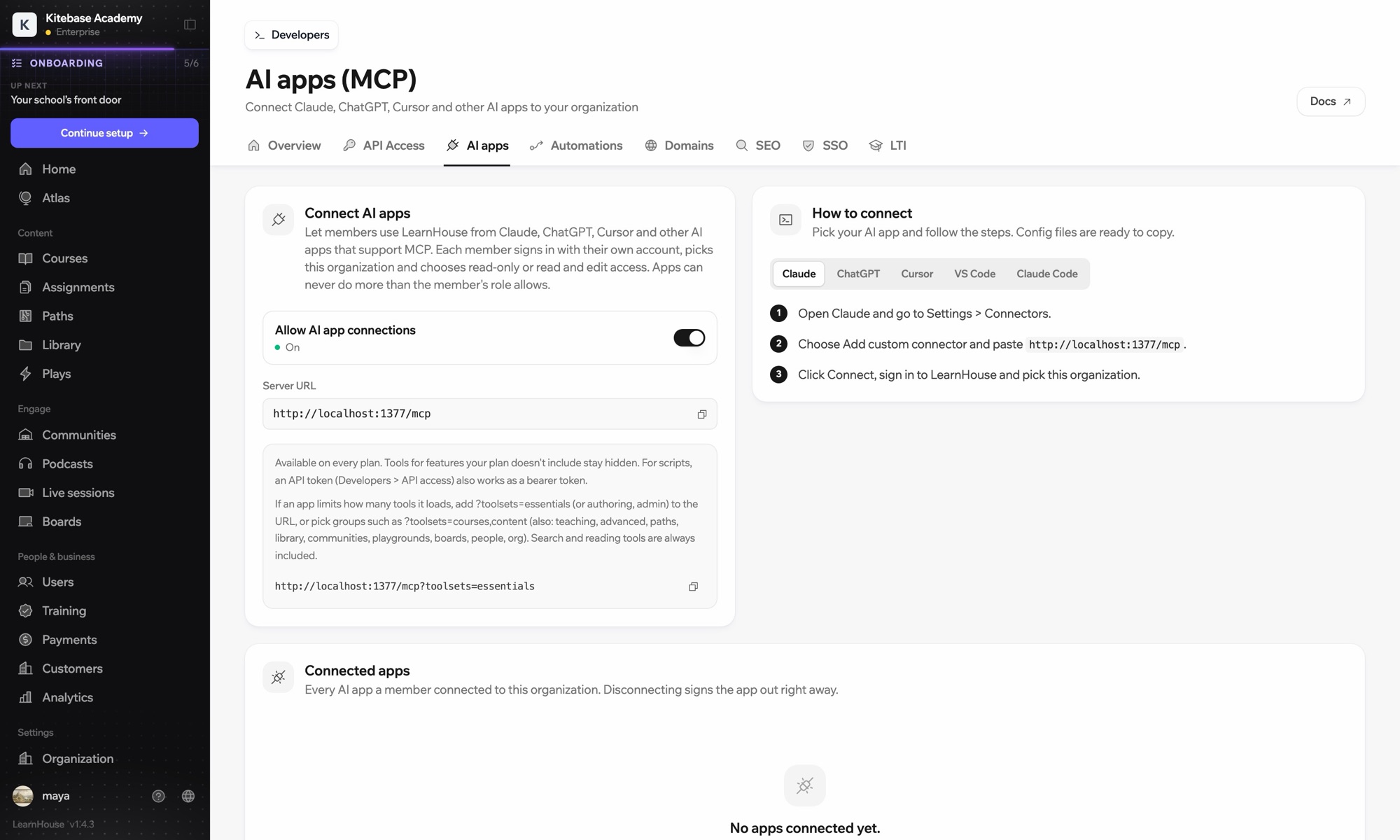
LearnHouse connects to VS Code through its MCP server, added in VS Code as an HTTP server. Once you sign in, the AI chat in VS Code can look up courses, edit lessons and read learner progress, limited to what your LearnHouse role allows.

Jak się łączy
Serwer MCP LearnHouse
Plan
Pro i wyższe
Powiązana strona LearnHouse
Zapytaj Atlasa
ProSerwer MCP LearnHouseAplikacje AIAutomatyzacje
Co możesz zrobić

Co daje Ci VS Code

Serwer MCP

Keep docs and lessons in step

Ask the chat to update the lesson that explains a function you just changed in the code beside it.
01 / 3
Połącz Claude lub ChatGPT przez MCP
Claude · LearnHouse połączony
Kto utknął w Seller Bootcamp?
learnhouse · list_learners
3 kursantów nie otworzyło rozdziału 2 od 14 dni. Wysłać im przypomnienie?
Tak, wyślij.
Konfiguracja

Skonfiguruj w kilka minut

  1. 1

    Add the server

    Run the command MCP: Add Server and choose HTTP.

  2. 2

    Paste the URL

    Use the server URL shown under Connect AI apps in your LearnHouse dashboard and give it a name.

  3. 3

    Sign in

    Start the server. VS Code opens LearnHouse so you can sign in and pick the organization.

W planie

Prood $143/mies., płatne rocznie

The API and MCP server come with Pro on LearnHouse Cloud.

Zacznij 14-dniowy okres próbnyPorównaj plany
FAQ

Pytania o VS Code

Does VS Code need an API token?

No. It signs in through your browser. An API token also works as a bearer token if you prefer scripts.

Can it delete courses?

It can only do what your LearnHouse role allows, and you choose read-only or read and edit access when you connect.

My app loads too many tools. What can I do?

Add ?toolsets=essentials to the server URL, or name the groups you need, such as ?toolsets=courses,content.

Dobrze współpracuje z

Claude CodeConnect Claude Code to your academy with one terminal command.CursorUse LearnHouse from Cursor and other MCP clients.AnthropicClaudeRun your academy from Claude with the LearnHouse MCP server.OpenAIChatGPTBuild and manage courses from ChatGPT through MCP.Google GeminiGoogle GeminiThe AI behind LearnHouse AI, already powering your platform.SlackSlackPost course completions and new sign-ups to Slack through the LearnHouse Zapier app.
Połącz swoje narzędzia już w pierwszym tygodniu

Połącz swoje narzędzia już w pierwszym tygodniu

Wypróbuj dowolny plan przez 14 dni za darmo. Bez karty kredytowej, 0% prowizji platformy, a integracje w cenie.

Zacznij darmowy okres próbny

Albo hostuj wersję open source u siebie, za darmo