LearnHouse
เริ่มต้นใช้งาน
LearnHouse
AIEnterpriseนักพัฒนามือถือราคา
GitHub...
เข้าสู่ระบบเริ่มต้นใช้งาน

แพลตฟอร์มการเรียนรู้โอเพนซอร์สยุคใหม่

XGitHubLinkedInDiscord

ผลิตภัณฑ์

  • ครีเอเตอร์
  • สถาบันการศึกษา
  • Enterprise
  • นักพัฒนา
  • แอปมือถือ
  • โอเพนซอร์ส
  • ดีไซน์
  • การถูกค้นพบ
  • ราคา

ฟีเจอร์

  • คอร์ส
  • AI
  • การชำระเงิน
  • ชุมชน
  • พอดแคสต์
  • บอร์ด
  • Plays
  • โค้ด
  • การวิเคราะห์
  • คอร์สวิดีโอ
  • จดหมายข่าว
  • คลาสสด
  • เส้นทางการเรียนรู้
  • ปล่อยเนื้อหาเป็นช่วง
  • งานที่มอบหมาย
  • ใบรับรอง
  • สถานการณ์จำลอง
  • การอบรมภาคบังคับ
  • แปลคอร์ส
  • การเชื่อมต่อ

แหล่งข้อมูล

  • เอกสาร
  • มหาวิทยาลัย
  • บล็อก
  • บันทึกการเปลี่ยนแปลง
  • โฮสต์เอง
  • อภิธานศัพท์
  • GitHub
  • เปรียบเทียบแพลตฟอร์ม

บริษัท

  • ติดต่อ
  • ความปลอดภัย
  • อุตสาหกรรม

บริษัท

  • ติดต่อ
  • ความปลอดภัย
  • อุตสาหกรรม

เปรียบเทียบ LearnHouse กับ

  • Udemy
  • Moodle
  • Teachable
  • Open edX
  • Thinkific
  • Canvas
  • Kajabi
  • Skool
  • Podia
  • Coursera
  • เปรียบเทียบทั้งหมด

ทางเลือกแทน

  • Udemy
  • Teachable
  • Thinkific
  • Kajabi
  • Skool
  • Podia
  • Coursera
  • Moodle
  • Open edX
  • Canvas LMS
  • Skillshare
  • Mighty Networks
  • LearnWorlds
  • Circle
เจอบั๊กหรือปัญหาใช่ไหม?
Open Source Initiative

โอเพนซอร์ส

ใช้สัญญาอนุญาต AGPLv3 โฮสต์เองได้

พร้อมรองรับ GDPR

สอดคล้องกับกฎหมายคุ้มครองข้อมูลของสหภาพยุโรป

G2

G2

รีวิวเราบน G2

© 2026 LearnHouse, Inc.

  • ความเป็นส่วนตัว
  • ข้อกำหนด
  • นโยบายคุกกี้
การเชื่อมต่อทั้งหมด

Use Brightspace with LearnHouse: Import or LTIBrightspace courses, a better experience

Import from D2L or launch LearnHouse inside Brightspace.

ทดลองใช้ฟรี

ฟรี 14 วัน · ไม่ต้องใช้บัตรเครดิต

Brightspace connects to LearnHouse in two ways: Brightspace course exports can be imported, and LearnHouse can be added as an LTI 1.3 tool with the manual setup.

วิธีเชื่อมต่อ
LTI 1.3
แพ็กเกจ
Business ขึ้นไป
หน้า LearnHouse ที่เกี่ยวข้อง
SSO และ LTI
BusinessLTI 1.3LMS และมาตรฐาน
คุณทำอะไรได้บ้าง

Brightspace (D2L) ช่วยอะไรคุณได้

นำเข้าจาก LMS

Bring Brightspace courses over

Export a course from Brightspace and import it as an editable LearnHouse course.
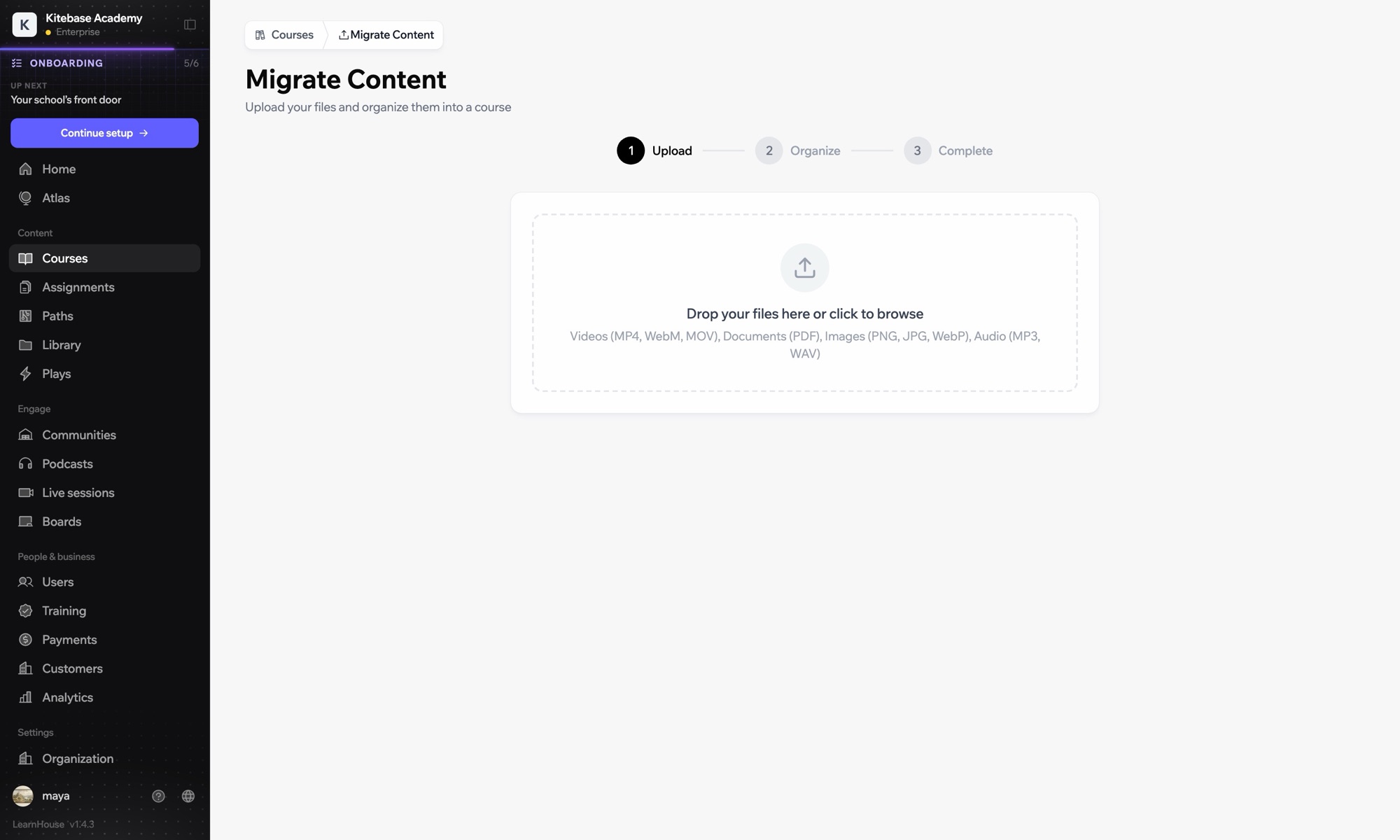
01 / 3
นำเข้าคอร์สจาก LMS อื่น
Moodle
Canvas
Blackboard
Open edX
0
คอร์สที่นำเข้าแล้ว
การตั้งค่า

ตั้งค่าเสร็จในไม่กี่นาที

  1. 1

    Choose import or LTI

    Import to move courses, or connect LTI to keep Brightspace.

  2. 2

    To import

    Export the course from Brightspace and upload it in Courses → Import.

  3. 3

    To connect

    In Developers → LTI choose Add manually and register LearnHouse as an LTI 1.3 tool in Brightspace.

รวมอยู่ในแผน

Businessเริ่มต้น $319/เดือน ชำระรายปี

Course import works on every plan. LTI 1.3 is part of Business.

เริ่มทดลองใช้ 14 วันเปรียบเทียบแผน
คำถามที่พบบ่อย

คำถามเกี่ยวกับ Brightspace (D2L)

Is there a Brightspace setup guide?

Brightspace uses the generic manual LTI 1.3 setup: LearnHouse shows the URLs and key, and you copy back the platform values.

Can we run both for a while?

Yes. Import some courses and launch others from Brightspace through LTI.

ใช้ร่วมกับ

LTI 1.3Launch LearnHouse courses inside any LTI 1.3 LMS, with grades synced back.InstructureCanvas LMSImport Canvas courses and launch LearnHouse from Canvas with LTI 1.3.MoodleMoodleImport Moodle courses or launch LearnHouse inside Moodle with LTI 1.3.Open edXImport Open edX courses and launch LearnHouse from Open edX with LTI 1.3.Common CartridgeImport IMS Common Cartridge packages into LearnHouse courses.SCORMUpload SCORM packages and track score and completion.
เชื่อมต่อเครื่องมือของคุณได้ภายในสัปดาห์แรก

เชื่อมต่อเครื่องมือของคุณได้ภายในสัปดาห์แรก

ลองแผนไหนก็ได้ฟรี 14 วัน ไม่ต้องใช้บัตรเครดิต ค่าธรรมเนียมแพลตฟอร์ม 0% และมีการเชื่อมต่อให้ครบ

ทดลองใช้ฟรี

หรือโฮสต์เอดิชันโอเพนซอร์สเองได้ฟรี