LearnHouse
Bắt đầu
LearnHouse
AIEnterpriseNhà phát triểnDi độngBảng giá
GitHub...
Đăng nhậpBắt đầu

Nền tảng học tập mã nguồn mở hiện đại, thế hệ mới

XGitHubLinkedInDiscord

Sản phẩm

  • Nhà sáng tạo
  • Giáo dục
  • Enterprise
  • Nhà phát triển
  • Ứng dụng di động
  • Mã nguồn mở
  • Thiết kế
  • Khả năng được tìm thấy
  • Bảng giá

Tính năng

  • Khóa học
  • AI
  • Thanh toán
  • Cộng đồng
  • Podcast
  • Bảng trắng
  • Plays
  • Code
  • Phân tích
  • Khóa học video
  • Bản tin
  • Lớp trực tiếp
  • Lộ trình học
  • Mở bài theo lịch
  • Bài tập
  • Chứng chỉ
  • Kịch bản
  • Đào tạo bắt buộc
  • Dịch khóa học
  • Tích hợp

Tài nguyên

  • Tài liệu
  • Học viện
  • Blog
  • Nhật ký thay đổi
  • Tự lưu trữ
  • Thuật ngữ
  • GitHub
  • So sánh các nền tảng

Công ty

  • Liên hệ
  • Bảo mật
  • Ngành nghề

Công ty

  • Liên hệ
  • Bảo mật
  • Ngành nghề

So sánh LearnHouse với

  • Udemy
  • Moodle
  • Teachable
  • Open edX
  • Thinkific
  • Canvas
  • Kajabi
  • Skool
  • Podia
  • Coursera
  • Tất cả so sánh

Lựa chọn thay thế cho

  • Udemy
  • Teachable
  • Thinkific
  • Kajabi
  • Skool
  • Podia
  • Coursera
  • Moodle
  • Open edX
  • Canvas LMS
  • Skillshare
  • Mighty Networks
  • LearnWorlds
  • Circle
Bạn gặp lỗi hoặc sự cố?
Open Source Initiative

Mã nguồn mở

Giấy phép AGPLv3, có thể tự lưu trữ

Sẵn sàng GDPR

Tuân thủ quy định bảo vệ dữ liệu của EU

G2

G2

Đánh giá chúng tôi trên G2

© 2026 LearnHouse, Inc.

  • Quyền riêng tư
  • Điều khoản
  • Chính sách cookie
Tất cả tích hợp
Anthropic

Use Claude with LearnHouse: Build Courses by ChatAsk Claude to build the course. It shows up in your academy.

The LearnHouse MCP server gives Claude safe access to your organization, so you can create courses, edit lessons and pull learner data from a chat.

Dùng thử miễn phí

Miễn phí 14 ngày · Không cần thẻ tín dụng

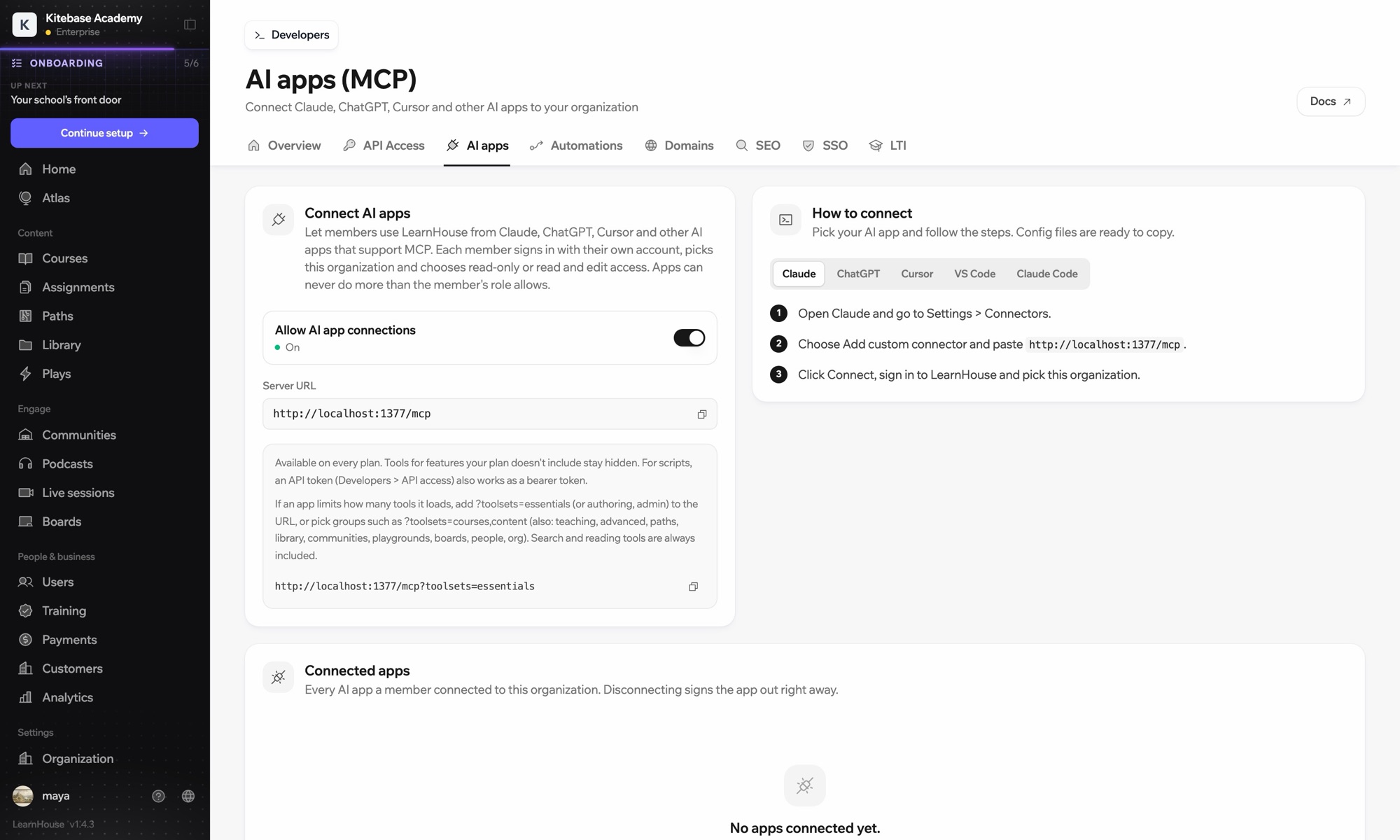
Claude reaches your LearnHouse academy through the LearnHouse MCP server, added in Claude as a custom connector. After you sign in, Claude can create courses, edit lessons and read learner data, never beyond what your own role allows.

Cách kết nối
Máy chủ MCP của LearnHouse
Gói
Pro trở lên
Trang LearnHouse liên quan
Hỏi Atlas
ProMáy chủ MCP của LearnHouseỨng dụng AITự động hóa
Bạn làm được gì

Claude giúp bạn làm gì

MCP server

Draft a full course from a conversation

Describe the course and Claude creates the chapters, lessons and quizzes in LearnHouse for you to review.
01 / 4
Kết nối Claude hoặc ChatGPT qua MCP
Claude · đã kết nối LearnHouse
Ai đang mắc kẹt ở Seller Bootcamp?
learnhouse · list_learners
3 học viên chưa mở chương 2 trong 14 ngày. Bạn có muốn tôi gửi nhắc nhở không?
Có, gửi đi.
Cài đặt

Cài đặt trong vài phút

  1. 1

    Copy the server URL

    In your LearnHouse dashboard, open Connect AI apps and copy the server URL.

  2. 2

    Add a connector

    In Claude, go to Settings → Connectors, choose Add custom connector and paste the URL.

  3. 3

    Sign in

    Click Connect, sign in to LearnHouse and pick your organization.

  4. 4

    Start asking

    Ask Claude to create, edit or look things up. Changes appear in your academy.

Có trong gói

Protừ $143/tháng khi thanh toán theo năm

The API and MCP server are included from the Pro plan.

Dùng thử 14 ngàySo sánh các gói
Câu hỏi thường gặp

Giải đáp về Claude

What is MCP?

Model Context Protocol is an open standard that lets AI assistants like Claude use outside tools. LearnHouse runs an MCP server so Claude can read and change your academy when you ask it to.

Can Claude change things without asking?

Claude only acts when you ask it to in the chat, and only with the access you approved for your account.

Which Claude apps work?

Any Claude app that supports custom MCP connectors, including Claude desktop and claude.ai. Claude Code works too.

Is my course content used to train Claude?

LearnHouse only sends Claude what it needs to answer your request. Check Anthropic's data settings for how your conversations are handled.

Can my whole team use it?

Yes. Each admin connects with their own LearnHouse account, so actions follow their role and permissions.

Do I need to code?

No. You paste one URL into Claude and sign in.

Kết hợp tốt với

OpenAIChatGPTBuild and manage courses from ChatGPT through MCP.CursorUse LearnHouse from Cursor and other MCP clients.Google GeminiGoogle GeminiThe AI behind LearnHouse AI, already powering your platform.VS CodeAdd the LearnHouse MCP server to VS Code and work on courses from the editor.Claude CodeConnect Claude Code to your academy with one terminal command.ZapierZapierUse the official LearnHouse app on Zapier to connect events to other apps.
Kết nối các công cụ của bạn ngay trong tuần đầu

Kết nối các công cụ của bạn ngay trong tuần đầu

Dùng thử bất kỳ gói nào miễn phí 14 ngày. Không cần thẻ tín dụng, phí nền tảng 0% và đã gồm các tích hợp.

Dùng thử miễn phí

Hoặc tự lưu trữ bản mã nguồn mở miễn phí