LearnHouse
Empezar
LearnHouse
IAEmpresasDesarrolladoresMóvilPrecios
GitHub...
Iniciar sesiónEmpezar

La plataforma de aprendizaje de código abierto de nueva generación

XGitHubLinkedInDiscord

Producto

  • Creadores
  • Educación
  • Empresas
  • Desarrolladores
  • App móvil
  • Código abierto
  • Diseño
  • Visibilidad
  • Precios

Funciones

  • Cursos
  • IA
  • Pagos
  • Comunidades
  • Podcasts
  • Tableros
  • Plays
  • Código
  • Analíticas
  • Cursos en vídeo
  • Newsletter
  • Sesiones en directo
  • Rutas de aprendizaje
  • Contenido por goteo
  • Tareas
  • Certificados
  • Escenarios
  • Formación obligatoria
  • Traducción de cursos
  • Integraciones

Recursos

  • Documentación
  • Universidad
  • Blog
  • Registro de cambios
  • Autoalojamiento
  • Glosario
  • GitHub
  • Comparar plataformas

Empresa

  • Contacto
  • Seguridad
  • Sectores

Empresa

  • Contacto
  • Seguridad
  • Sectores

Compara LearnHouse con

  • Udemy
  • Moodle
  • Teachable
  • Open edX
  • Thinkific
  • Canvas
  • Kajabi
  • Skool
  • Podia
  • Coursera
  • Todas las comparativas

Alternativas a

  • Udemy
  • Teachable
  • Thinkific
  • Kajabi
  • Skool
  • Podia
  • Coursera
  • Moodle
  • Open edX
  • Canvas LMS
  • Skillshare
  • Mighty Networks
  • LearnWorlds
  • Circle
¿Has encontrado un error o un problema?
Open Source Initiative

Código abierto

Licencia AGPLv3, autoalojable

Preparado para el RGPD

Cumple la normativa de protección de datos de la UE

G2

G2

Valóranos en G2

© 2026 LearnHouse, Inc.

  • Privacidad
  • Términos
  • Política de cookies
Todas las integraciones

Use VS Code with LearnHouse: Edit Courses in ChatEdit your courses without leaving the editor

VS Code talks to LearnHouse over MCP, so the chat panel can read and change your academy while you work on code next to it.

Empieza gratis

14 días gratis · Sin tarjeta

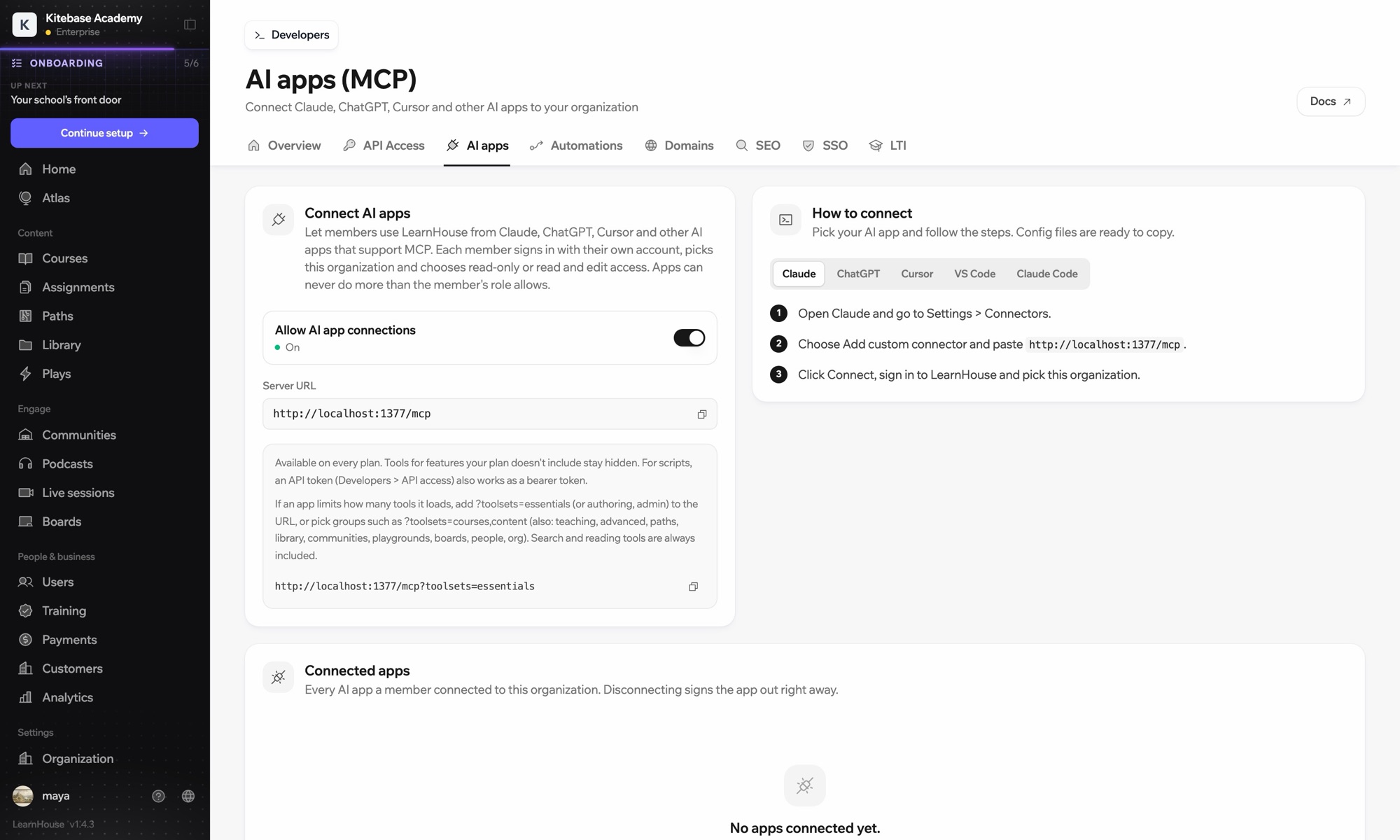
LearnHouse connects to VS Code through its MCP server, added in VS Code as an HTTP server. Once you sign in, the AI chat in VS Code can look up courses, edit lessons and read learner progress, limited to what your LearnHouse role allows.

Cómo se conecta
Servidor MCP de LearnHouse
Plan
Pro o superior
Página relacionada de LearnHouse
Pregúntale a Atlas
ProServidor MCP de LearnHouseApps de IAAutomatización
Qué puedes hacer

Qué hace VS Code por ti

Servidor MCP

Keep docs and lessons in step

Ask the chat to update the lesson that explains a function you just changed in the code beside it.
01 / 3
Conecta Claude o ChatGPT mediante MCP
Claude · LearnHouse conectado
¿Quién está atascado en Seller Bootcamp?
learnhouse · list_learners
3 alumnos no han abierto el capítulo 2 en 14 días. ¿Les envío un recordatorio?
Sí, envíalo.
Configuración

Configúralo en unos minutos

  1. 1

    Add the server

    Run the command MCP: Add Server and choose HTTP.

  2. 2

    Paste the URL

    Use the server URL shown under Connect AI apps in your LearnHouse dashboard and give it a name.

  3. 3

    Sign in

    Start the server. VS Code opens LearnHouse so you can sign in and pick the organization.

Incluido en

Prodesde $143/mes con facturación anual

The API and MCP server come with Pro on LearnHouse Cloud.

Prueba 14 díasComparar planes
Preguntas frecuentes

Preguntas sobre VS Code

Does VS Code need an API token?

No. It signs in through your browser. An API token also works as a bearer token if you prefer scripts.

Can it delete courses?

It can only do what your LearnHouse role allows, and you choose read-only or read and edit access when you connect.

My app loads too many tools. What can I do?

Add ?toolsets=essentials to the server URL, or name the groups you need, such as ?toolsets=courses,content.

Combina bien con

Claude CodeConnect Claude Code to your academy with one terminal command.CursorUse LearnHouse from Cursor and other MCP clients.AnthropicClaudeRun your academy from Claude with the LearnHouse MCP server.OpenAIChatGPTBuild and manage courses from ChatGPT through MCP.Google GeminiGoogle GeminiThe AI behind LearnHouse AI, already powering your platform.SlackSlackPost course completions and new sign-ups to Slack through the LearnHouse Zapier app.
Conecta tus herramientas en la primera semana

Conecta tus herramientas en la primera semana

Prueba cualquier plan gratis durante 14 días. Sin tarjeta, con 0% de comisiones y con las integraciones incluidas.

Empieza gratis

O autoaloja gratis la edición de código abierto