LearnHouse
Commencer
LearnHouse
IAEntrepriseDéveloppeursMobileTarifs
GitHub...
ConnexionCommencer

La plateforme d'apprentissage open source nouvelle génération

XGitHubLinkedInDiscord

Produit

  • Créateurs
  • Enseignement
  • Entreprise
  • Développeurs
  • Application mobile
  • Open source
  • Design
  • Visibilité
  • Tarifs

Fonctionnalités

  • Cours
  • IA
  • Paiements
  • Communautés
  • Podcasts
  • Tableaux
  • Plays
  • Code
  • Statistiques
  • Cours vidéo
  • Newsletter
  • Sessions en direct
  • Parcours
  • Contenu progressif
  • Devoirs
  • Certificats
  • Scénarios
  • Formations obligatoires
  • Traduction de cours
  • Intégrations

Ressources

  • Documentation
  • Université
  • Blog
  • Journal des modifications
  • Auto-hébergement
  • Glossaire
  • GitHub
  • Comparer les plateformes

Société

  • Contact
  • Sécurité
  • Secteurs

Société

  • Contact
  • Sécurité
  • Secteurs

Comparer LearnHouse avec

  • Udemy
  • Moodle
  • Teachable
  • Open edX
  • Thinkific
  • Canvas
  • Kajabi
  • Skool
  • Podia
  • Coursera
  • Toutes les comparaisons

Alternatives à

  • Udemy
  • Teachable
  • Thinkific
  • Kajabi
  • Skool
  • Podia
  • Coursera
  • Moodle
  • Open edX
  • Canvas LMS
  • Skillshare
  • Mighty Networks
  • LearnWorlds
  • Circle
Un bug ou un problème à signaler ?
Open Source Initiative

Open source

Sous licence AGPLv3, auto-hébergeable

Conforme au RGPD

Respecte les règles européennes de protection des données

G2

G2

Donnez votre avis sur G2

© 2026 LearnHouse, Inc.

  • Confidentialité
  • CGU
  • Politique de cookies
Toutes les intégrations

Use VS Code with LearnHouse: Edit Courses in ChatEdit your courses without leaving the editor

VS Code talks to LearnHouse over MCP, so the chat panel can read and change your academy while you work on code next to it.

Essai gratuit

14 jours gratuits · Sans carte bancaire

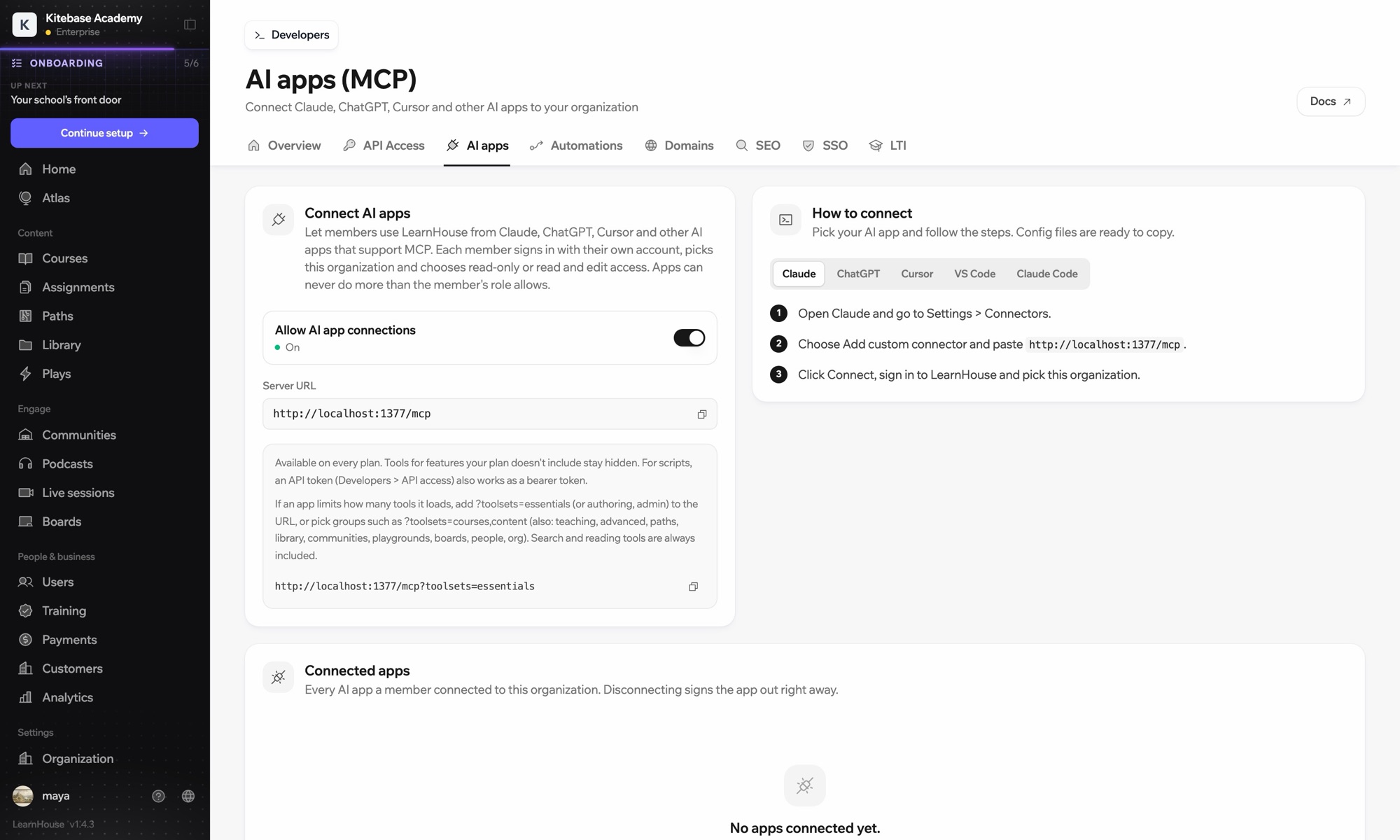
LearnHouse connects to VS Code through its MCP server, added in VS Code as an HTTP server. Once you sign in, the AI chat in VS Code can look up courses, edit lessons and read learner progress, limited to what your LearnHouse role allows.

Comment ça se connecte
Serveur MCP LearnHouse
Formule
Pro et plus
Page LearnHouse associée
Demander à Atlas
ProServeur MCP LearnHouseApplications IAAutomatisation
Ce que vous pouvez faire

Ce que VS Code vous apporte

Serveur MCP

Keep docs and lessons in step

Ask the chat to update the lesson that explains a function you just changed in the code beside it.
01 / 3
Connectez Claude ou ChatGPT via MCP
Claude · LearnHouse connecté
Qui bloque dans Seller Bootcamp ?
learnhouse · list_learners
3 apprenants n'ont pas ouvert le chapitre 2 depuis 14 jours. Je leur envoie une relance ?
Oui, envoie-la.
Configuration

Prêt en quelques minutes

  1. 1

    Add the server

    Run the command MCP: Add Server and choose HTTP.

  2. 2

    Paste the URL

    Use the server URL shown under Connect AI apps in your LearnHouse dashboard and give it a name.

  3. 3

    Sign in

    Start the server. VS Code opens LearnHouse so you can sign in and pick the organization.

Inclus dans

Prodès $143/mois, facturé annuellement

The API and MCP server come with Pro on LearnHouse Cloud.

Démarrer l'essai de 14 joursComparer les formules
FAQ

Vos questions sur VS Code

Does VS Code need an API token?

No. It signs in through your browser. An API token also works as a bearer token if you prefer scripts.

Can it delete courses?

It can only do what your LearnHouse role allows, and you choose read-only or read and edit access when you connect.

My app loads too many tools. What can I do?

Add ?toolsets=essentials to the server URL, or name the groups you need, such as ?toolsets=courses,content.

Se marie bien avec

Claude CodeConnect Claude Code to your academy with one terminal command.CursorUse LearnHouse from Cursor and other MCP clients.AnthropicClaudeRun your academy from Claude with the LearnHouse MCP server.OpenAIChatGPTBuild and manage courses from ChatGPT through MCP.Google GeminiGoogle GeminiThe AI behind LearnHouse AI, already powering your platform.SlackSlackPost course completions and new sign-ups to Slack through the LearnHouse Zapier app.
Connectez vos outils dès la première semaine

Connectez vos outils dès la première semaine

Essayez n'importe quelle formule gratuitement pendant 14 jours. Sans carte bancaire, 0 % de frais de plateforme et intégrations incluses.

Démarrer l'essai gratuit

Ou auto-hébergez gratuitement l'édition open source