LearnHouse
开始使用
LearnHouse
AI企业版开发者移动端定价
GitHub...
登录开始使用

新一代开源学习平台

XGitHubLinkedInDiscord

产品

  • 创作者
  • 学术机构
  • 企业版
  • 开发者
  • 移动应用
  • 开源
  • 设计
  • 可发现性
  • 定价

功能

  • 课程
  • AI
  • 支付
  • 社区
  • 播客
  • 白板
  • Plays
  • 代码
  • 分析
  • 视频课程
  • 邮件通讯
  • 直播课
  • 学习路径
  • 定时解锁
  • 作业
  • 证书
  • 情景演练
  • 必修培训
  • 课程翻译
  • 集成

资源

  • 文档
  • 学院
  • 博客
  • 更新日志
  • 自托管
  • 术语表
  • GitHub
  • 平台对比

公司

  • 联系我们
  • 安全
  • 行业

公司

  • 联系我们
  • 安全
  • 行业

LearnHouse 对比

  • Udemy
  • Moodle
  • Teachable
  • Open edX
  • Thinkific
  • Canvas
  • Kajabi
  • Skool
  • Podia
  • Coursera
  • 全部对比

替代方案:

  • Udemy
  • Teachable
  • Thinkific
  • Kajabi
  • Skool
  • Podia
  • Coursera
  • Moodle
  • Open edX
  • Canvas LMS
  • Skillshare
  • Mighty Networks
  • LearnWorlds
  • Circle
发现了 Bug 或问题?
Open Source Initiative

开源

AGPLv3 许可,可自托管

符合 GDPR

遵守欧盟数据保护法规

G2

G2

在 G2 上评价我们

© 2026 LearnHouse, Inc.

  • 隐私政策
  • 服务条款
  • Cookie 政策
全部集成

Use Microsoft Teams with LearnHouse: Live ClassesTraining on Teams, tracked like a course

Schedule a live session in LearnHouse, add your Teams meeting link, and keep reminders, attendance and the recording with the course.

免费试用

免费试用 14 天,无需信用卡

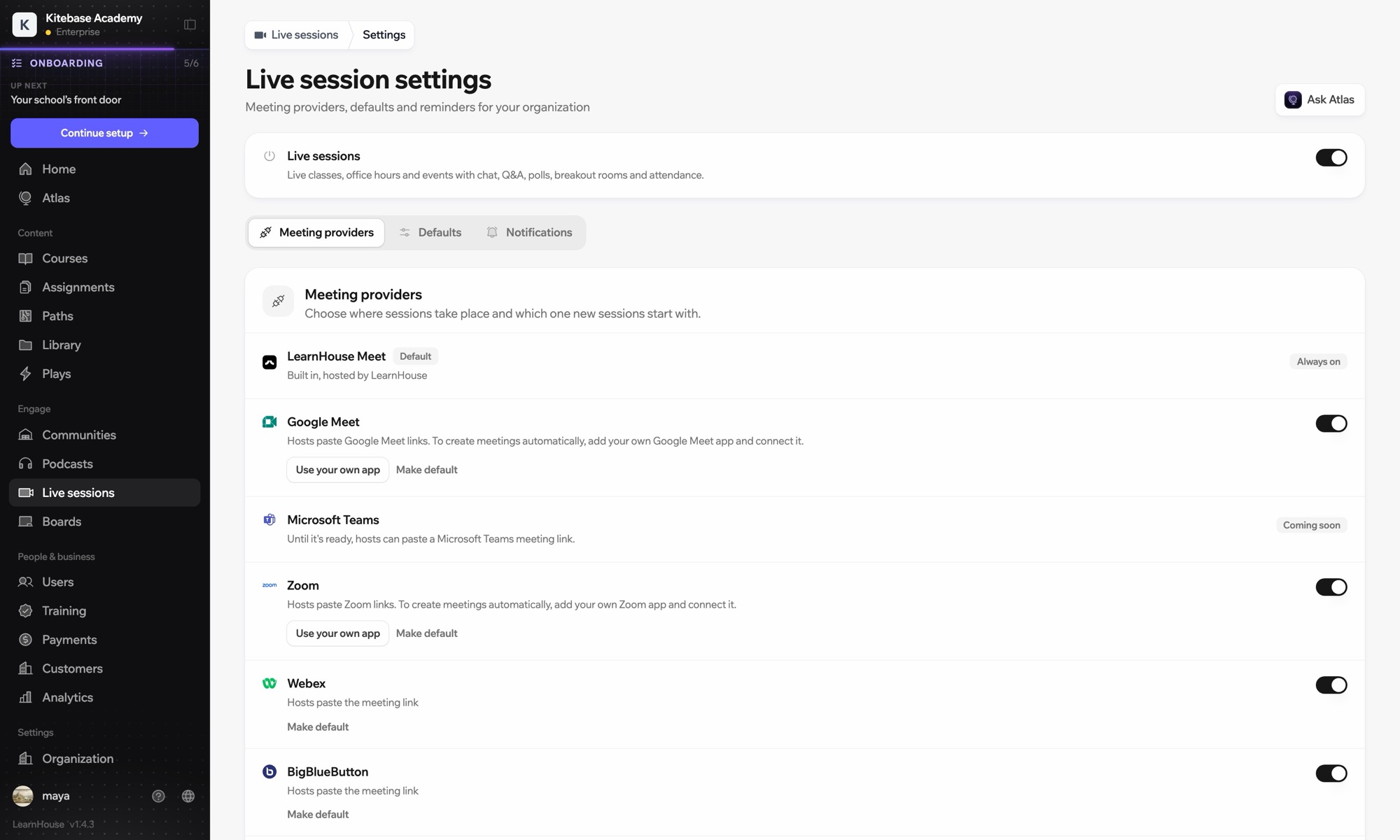
Microsoft Teams works with LearnHouse live sessions by link or through a connected Microsoft 365 account. Connected, each session is an Outlook event with a Teams meeting, and attendance reports, recordings and transcripts come back.

连接方式
直播课程服务商
套餐
Business 及以上
相关 LearnHouse 页面
直播课
Business直播课程服务商直播课沟通
你能用它做什么

Microsoft Teams 能为你做什么

直播课

Meetings and Outlook invites made for you

Connect a Microsoft 365 account and each session becomes an Outlook event with a Teams meeting. People who RSVP get the invite.
01 / 4
直播课服务商:Zoom、Google Meet、Teams
MC
LH
SP
直播中 · 答疑时间24 人观看
录像的 AI 摘要
设置

几分钟就能设置好

  1. 1

    Connect Microsoft 365

    An admin opens Live sessions → Settings, adds the Microsoft app details and connects the account.

  2. 2

    Schedule a session

    Choose Microsoft Teams; LearnHouse creates the Outlook event with the Teams link.

  3. 3

    Teach

    Learners join from the session page or the invite. Chat, Q&A and polls stay on the session page.

  4. 4

    Review attendance

    Attendance, recordings and transcripts sync back after the meeting.

包含于

Business按年付费,每月 $319 起

Live sessions are included in Business.

开始 14 天试用对比套餐
常见问题

关于 Microsoft Teams 的常见问题

Can hosts just paste a Teams link?

Yes. Without a connected account, paste a teams.microsoft.com link; attendance and recordings then aren't imported automatically.

Can attendees see each other on the invite?

No. Attendees are hidden from each other on the Outlook event.

Can a session move without confusing people?

Yes. Reschedules and cancellations flow through Outlook and Teams to everyone invited.

搭配使用效果更好

Microsoft Entra IDSingle sign-on with Microsoft Entra ID (Azure AD) over OpenID Connect.ZoomZoomEmbed Zoom links for live classes and webinars.WebexWebexHost LearnHouse live sessions with Webex links.Google MeetGoogle MeetEmbed Google Meet links for live video sessions.BigBlueButtonBigBlueButtonRun live sessions in BigBlueButton rooms and keep the session page in LearnHouse.Outlook CalendarAdd live sessions to Outlook, or send invites from a connected Microsoft 365 calendar.
第一周就把你的工具连起来

第一周就把你的工具连起来

任意套餐免费试用 14 天。无需信用卡,平台手续费 0%,集成功能一应俱全。

免费试用

也可以免费自托管开源版