LearnHouse
Loslegen
LearnHouse
KIEnterpriseEntwicklerMobilPreise
GitHub...
AnmeldenLoslegen

Die moderne Open-Source-Lernplattform

XGitHubLinkedInDiscord

Produkt

  • Creator
  • Lehre
  • Enterprise
  • Entwickler
  • Mobile App
  • Open Source
  • Design
  • Auffindbarkeit
  • Preise

Funktionen

  • Kurse
  • KI
  • Zahlungen
  • Communities
  • Podcasts
  • Boards
  • Plays
  • Code
  • Analysen
  • Videokurse
  • Newsletter
  • Live-Sessions
  • Lernpfade
  • Zeitgesteuerte Inhalte
  • Aufgaben
  • Zertifikate
  • Szenarien
  • Pflichtschulungen
  • Kursübersetzung
  • Integrationen

Ressourcen

  • Dokumentation
  • University
  • Blog
  • Änderungsprotokoll
  • Self-Hosting
  • Glossar
  • GitHub
  • Plattformen vergleichen

Unternehmen

  • Kontakt
  • Sicherheit
  • Branchen

Unternehmen

  • Kontakt
  • Sicherheit
  • Branchen

LearnHouse im Vergleich mit

  • Udemy
  • Moodle
  • Teachable
  • Open edX
  • Thinkific
  • Canvas
  • Kajabi
  • Skool
  • Podia
  • Coursera
  • Alle Vergleiche

Alternativen zu

  • Udemy
  • Teachable
  • Thinkific
  • Kajabi
  • Skool
  • Podia
  • Coursera
  • Moodle
  • Open edX
  • Canvas LMS
  • Skillshare
  • Mighty Networks
  • LearnWorlds
  • Circle
Fehler oder Problem gefunden?
Open Source Initiative

Open Source

AGPLv3-Lizenz, selbst hostbar

DSGVO-konform

Erfüllt den EU-Datenschutz

G2

G2

Bewerten Sie uns auf G2

© 2026 LearnHouse, Inc.

  • Datenschutz
  • Nutzungsbedingungen
  • Cookie-Richtlinie
Alle Integrationen

Use Microsoft Teams with LearnHouse: Live ClassesTraining on Teams, tracked like a course

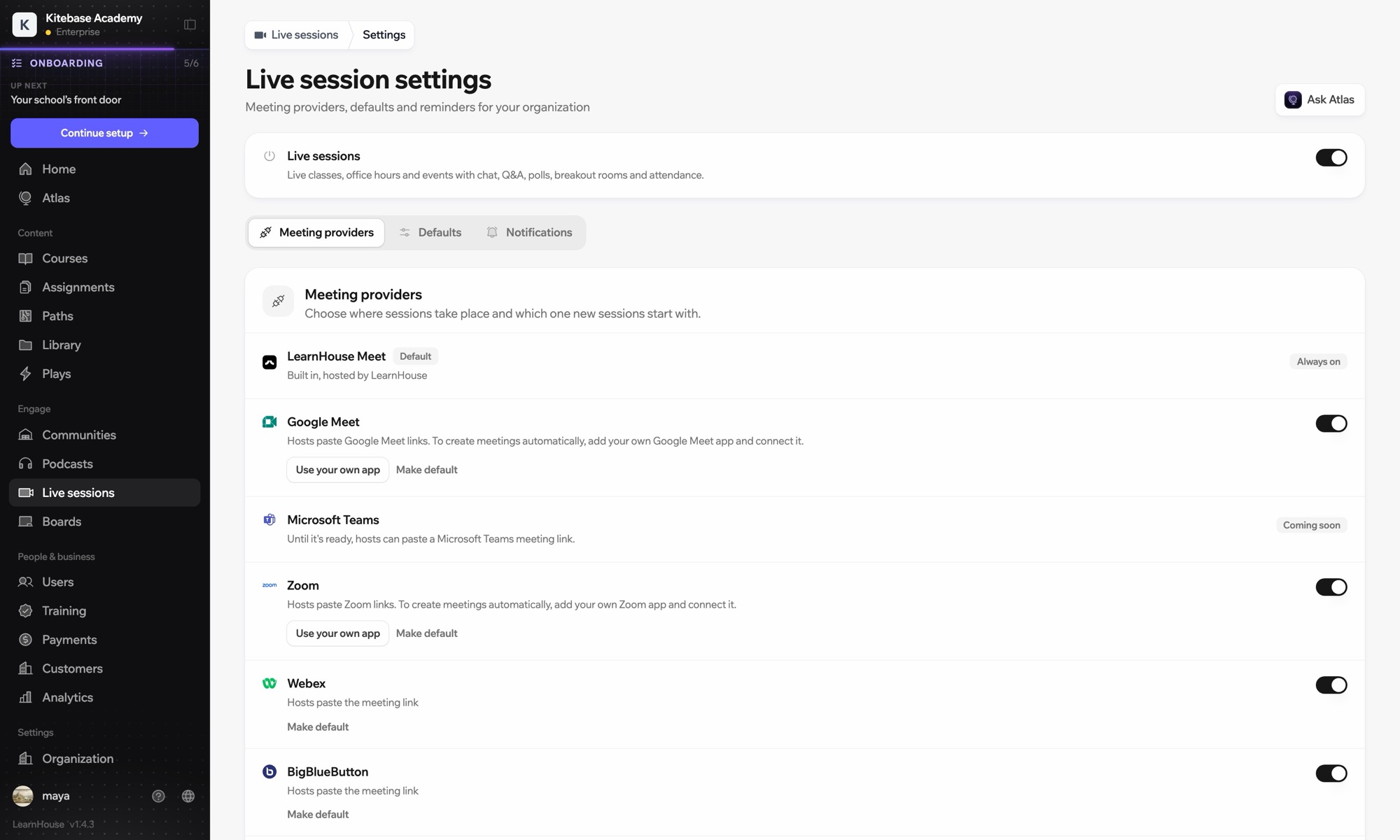
Schedule a live session in LearnHouse, add your Teams meeting link, and keep reminders, attendance and the recording with the course.

Kostenlos testen

14 Tage gratis · Keine Kreditkarte

Microsoft Teams works with LearnHouse live sessions by link or through a connected Microsoft 365 account. Connected, each session is an Outlook event with a Teams meeting, and attendance reports, recordings and transcripts come back.

So wird verbunden
Anbieter für Live-Sessions
Tarif
ab Business
Passende LearnHouse-Seite
Live-Sessions
BusinessAnbieter für Live-SessionsLive-UnterrichtKommunikation
Was Sie damit tun können

Das bringt Ihnen Microsoft Teams

Live-Sessions

Meetings and Outlook invites made for you

Connect a Microsoft 365 account and each session becomes an Outlook event with a Teams meeting. People who RSVP get the invite.
01 / 4
Anbieter für Live-Sessions: Zoom, Google Meet, Teams
MC
LH
SP
LIVE · Sprechstunde24 schauen zu
KI-Zusammenfassung der Aufzeichnung
Einrichtung

In wenigen Minuten eingerichtet

  1. 1

    Connect Microsoft 365

    An admin opens Live sessions → Settings, adds the Microsoft app details and connects the account.

  2. 2

    Schedule a session

    Choose Microsoft Teams; LearnHouse creates the Outlook event with the Teams link.

  3. 3

    Teach

    Learners join from the session page or the invite. Chat, Q&A and polls stay on the session page.

  4. 4

    Review attendance

    Attendance, recordings and transcripts sync back after the meeting.

Enthalten in

Businessab $319/Monat bei jährlicher Abrechnung

Live sessions are included in Business.

14 Tage testenTarife vergleichen
FAQ

Fragen zu Microsoft Teams

Can hosts just paste a Teams link?

Yes. Without a connected account, paste a teams.microsoft.com link; attendance and recordings then aren't imported automatically.

Can attendees see each other on the invite?

No. Attendees are hidden from each other on the Outlook event.

Can a session move without confusing people?

Yes. Reschedules and cancellations flow through Outlook and Teams to everyone invited.

Passt gut zusammen mit

Microsoft Entra IDSingle sign-on with Microsoft Entra ID (Azure AD) over OpenID Connect.ZoomZoomEmbed Zoom links for live classes and webinars.WebexWebexHost LearnHouse live sessions with Webex links.Google MeetGoogle MeetEmbed Google Meet links for live video sessions.BigBlueButtonBigBlueButtonRun live sessions in BigBlueButton rooms and keep the session page in LearnHouse.Outlook CalendarAdd live sessions to Outlook, or send invites from a connected Microsoft 365 calendar.
Verbinden Sie Ihre Tools schon in der ersten Woche

Verbinden Sie Ihre Tools schon in der ersten Woche

Testen Sie jeden Tarif 14 Tage kostenlos. Ohne Kreditkarte, mit 0 % Plattformgebühr und inklusive Integrationen.

Kostenlos testen

Oder hosten Sie die Open-Source-Edition kostenlos selbst