LearnHouse
Loslegen
LearnHouse
KIEnterpriseEntwicklerMobilPreise
GitHub...
AnmeldenLoslegen

Die moderne Open-Source-Lernplattform

XGitHubLinkedInDiscord

Produkt

  • Creator
  • Lehre
  • Enterprise
  • Entwickler
  • Mobile App
  • Open Source
  • Design
  • Auffindbarkeit
  • Preise

Funktionen

  • Kurse
  • KI
  • Zahlungen
  • Communities
  • Podcasts
  • Boards
  • Plays
  • Code
  • Analysen
  • Videokurse
  • Newsletter
  • Live-Sessions
  • Lernpfade
  • Zeitgesteuerte Inhalte
  • Aufgaben
  • Zertifikate
  • Szenarien
  • Pflichtschulungen
  • Kursübersetzung
  • Integrationen

Ressourcen

  • Dokumentation
  • University
  • Blog
  • Änderungsprotokoll
  • Self-Hosting
  • Glossar
  • GitHub
  • Plattformen vergleichen

Unternehmen

  • Kontakt
  • Sicherheit
  • Branchen

Unternehmen

  • Kontakt
  • Sicherheit
  • Branchen

LearnHouse im Vergleich mit

  • Udemy
  • Moodle
  • Teachable
  • Open edX
  • Thinkific
  • Canvas
  • Kajabi
  • Skool
  • Podia
  • Coursera
  • Alle Vergleiche

Alternativen zu

  • Udemy
  • Teachable
  • Thinkific
  • Kajabi
  • Skool
  • Podia
  • Coursera
  • Moodle
  • Open edX
  • Canvas LMS
  • Skillshare
  • Mighty Networks
  • LearnWorlds
  • Circle
Fehler oder Problem gefunden?
Open Source Initiative

Open Source

AGPLv3-Lizenz, selbst hostbar

DSGVO-konform

Erfüllt den EU-Datenschutz

G2

G2

Bewerten Sie uns auf G2

© 2026 LearnHouse, Inc.

  • Datenschutz
  • Nutzungsbedingungen
  • Cookie-Richtlinie
Alle Integrationen

Use VS Code with LearnHouse: Edit Courses in ChatEdit your courses without leaving the editor

VS Code talks to LearnHouse over MCP, so the chat panel can read and change your academy while you work on code next to it.

Kostenlos testen

14 Tage gratis · Keine Kreditkarte

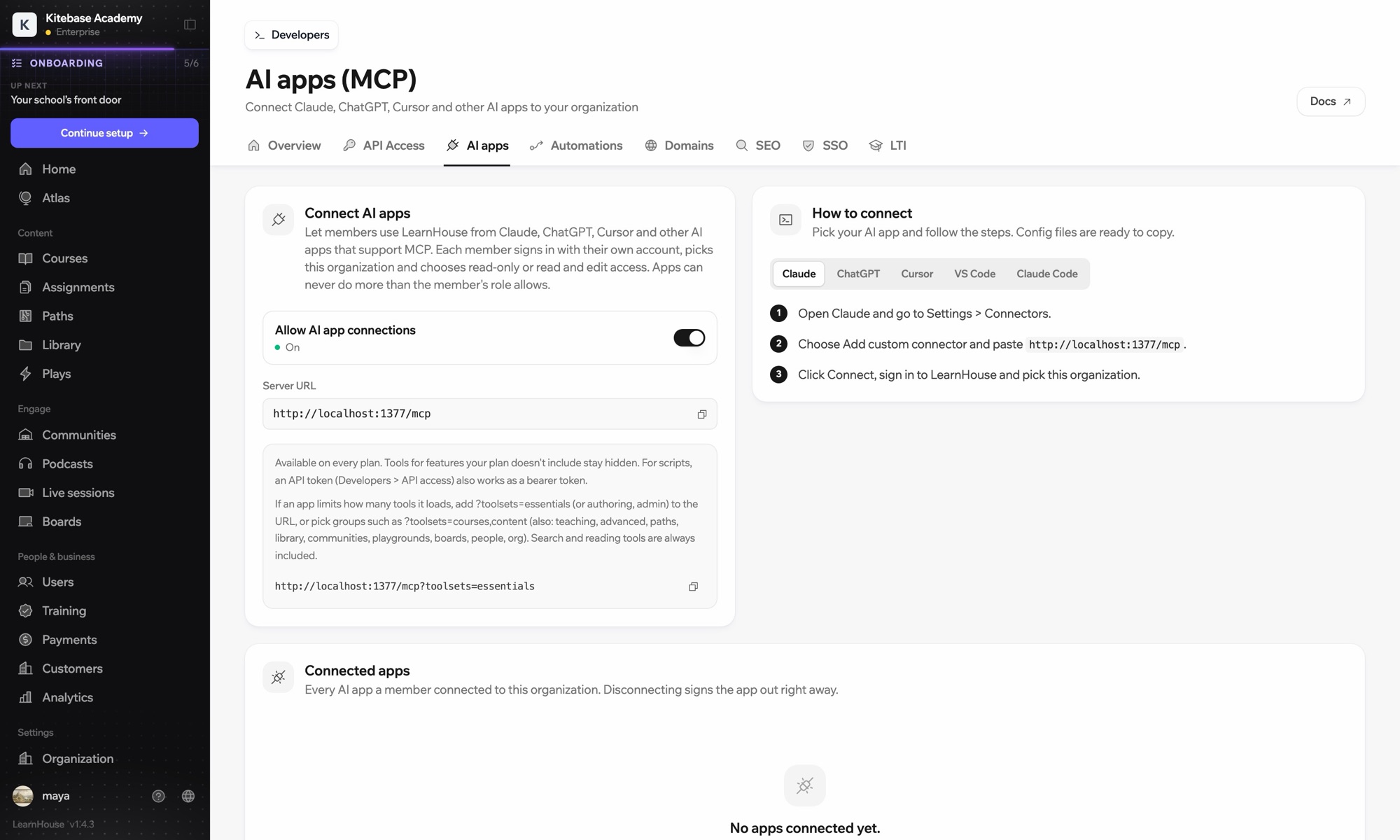
LearnHouse connects to VS Code through its MCP server, added in VS Code as an HTTP server. Once you sign in, the AI chat in VS Code can look up courses, edit lessons and read learner progress, limited to what your LearnHouse role allows.

So wird verbunden
LearnHouse-MCP-Server
Tarif
ab Pro
Passende LearnHouse-Seite
Frag Atlas
ProLearnHouse-MCP-ServerKI-AppsAutomatisierung
Was Sie damit tun können

Das bringt Ihnen VS Code

MCP-Server

Keep docs and lessons in step

Ask the chat to update the lesson that explains a function you just changed in the code beside it.
01 / 3
Claude oder ChatGPT per MCP verbinden
Claude · LearnHouse verbunden
Wer hängt in Seller Bootcamp fest?
learnhouse · list_learners
3 Lernende haben Kapitel 2 seit 14 Tagen nicht geöffnet. Soll ich ihnen eine Erinnerung schicken?
Ja, schick sie.
Einrichtung

In wenigen Minuten eingerichtet

  1. 1

    Add the server

    Run the command MCP: Add Server and choose HTTP.

  2. 2

    Paste the URL

    Use the server URL shown under Connect AI apps in your LearnHouse dashboard and give it a name.

  3. 3

    Sign in

    Start the server. VS Code opens LearnHouse so you can sign in and pick the organization.

Enthalten in

Proab $143/Monat bei jährlicher Abrechnung

The API and MCP server come with Pro on LearnHouse Cloud.

14 Tage testenTarife vergleichen
FAQ

Fragen zu VS Code

Does VS Code need an API token?

No. It signs in through your browser. An API token also works as a bearer token if you prefer scripts.

Can it delete courses?

It can only do what your LearnHouse role allows, and you choose read-only or read and edit access when you connect.

My app loads too many tools. What can I do?

Add ?toolsets=essentials to the server URL, or name the groups you need, such as ?toolsets=courses,content.

Passt gut zusammen mit

Claude CodeConnect Claude Code to your academy with one terminal command.CursorUse LearnHouse from Cursor and other MCP clients.AnthropicClaudeRun your academy from Claude with the LearnHouse MCP server.OpenAIChatGPTBuild and manage courses from ChatGPT through MCP.Google GeminiGoogle GeminiThe AI behind LearnHouse AI, already powering your platform.SlackSlackPost course completions and new sign-ups to Slack through the LearnHouse Zapier app.
Verbinden Sie Ihre Tools schon in der ersten Woche

Verbinden Sie Ihre Tools schon in der ersten Woche

Testen Sie jeden Tarif 14 Tage kostenlos. Ohne Kreditkarte, mit 0 % Plattformgebühr und inklusive Integrationen.

Kostenlos testen

Oder hosten Sie die Open-Source-Edition kostenlos selbst