LearnHouse
Loslegen
LearnHouse
KIEnterpriseEntwicklerMobilPreise
GitHub...
AnmeldenLoslegen

Die moderne Open-Source-Lernplattform

XGitHubLinkedInDiscord

Produkt

  • Creator
  • Lehre
  • Enterprise
  • Entwickler
  • Mobile App
  • Open Source
  • Design
  • Auffindbarkeit
  • Preise

Funktionen

  • Kurse
  • KI
  • Zahlungen
  • Communities
  • Podcasts
  • Boards
  • Plays
  • Code
  • Analysen
  • Videokurse
  • Newsletter
  • Live-Sessions
  • Lernpfade
  • Zeitgesteuerte Inhalte
  • Aufgaben
  • Zertifikate
  • Szenarien
  • Pflichtschulungen
  • Kursübersetzung
  • Integrationen

Ressourcen

  • Dokumentation
  • University
  • Blog
  • Änderungsprotokoll
  • Self-Hosting
  • Glossar
  • GitHub
  • Plattformen vergleichen

Unternehmen

  • Kontakt
  • Sicherheit
  • Branchen

Unternehmen

  • Kontakt
  • Sicherheit
  • Branchen

LearnHouse im Vergleich mit

  • Udemy
  • Moodle
  • Teachable
  • Open edX
  • Thinkific
  • Canvas
  • Kajabi
  • Skool
  • Podia
  • Coursera
  • Alle Vergleiche

Alternativen zu

  • Udemy
  • Teachable
  • Thinkific
  • Kajabi
  • Skool
  • Podia
  • Coursera
  • Moodle
  • Open edX
  • Canvas LMS
  • Skillshare
  • Mighty Networks
  • LearnWorlds
  • Circle
Fehler oder Problem gefunden?
Open Source Initiative

Open Source

AGPLv3-Lizenz, selbst hostbar

DSGVO-konform

Erfüllt den EU-Datenschutz

G2

G2

Bewerten Sie uns auf G2

© 2026 LearnHouse, Inc.

  • Datenschutz
  • Nutzungsbedingungen
  • Cookie-Richtlinie
Alle Integrationen

Use WorkOS with LearnHouse: SAML or OIDC SSOLet IT connect SAML on its own

WorkOS brokers SAML and OIDC connections and gives your identity team a portal to finish the setup themselves.

Kostenlos testen

14 Tage gratis · Keine Kreditkarte

LearnHouse connects to identity providers through WorkOS, one of its two SSO providers next to Custom OIDC. WorkOS handles SAML and OIDC connections and offers a setup portal, so the person who manages your identity provider can configure it without access to LearnHouse settings.

So wird verbunden
SAML oder OIDC über WorkOS
Tarif
ab Business
Passende LearnHouse-Seite
SSO & LTI
BusinessSAML oder OIDC über WorkOSIdentität und SSO
Was Sie damit tun können

Das bringt Ihnen WorkOS

SSO & LTI

SAML when you need it

Teams whose identity provider only speaks SAML can still use single sign-on through WorkOS.
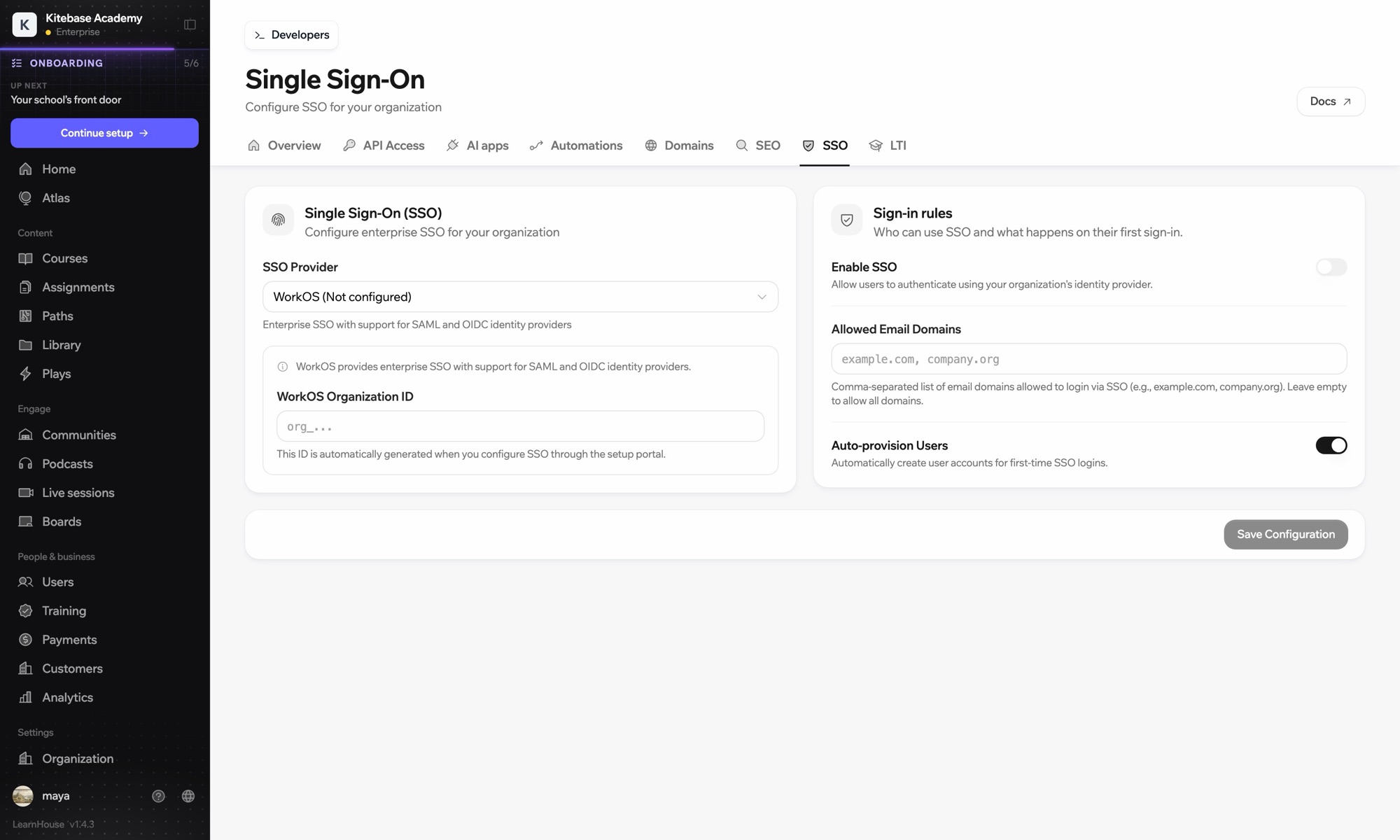
01 / 3
Einstellungen für Single Sign-On
Mit Okta anmelden
Canvas · LTI 1.3
SCIM: 248 Nutzer synchronisiert
Einrichtung

In wenigen Minuten eingerichtet

  1. 1

    Choose WorkOS

    In Organization → SSO, choose WorkOS as the provider.

  2. 2

    Open the setup portal

    Generate the portal link from LearnHouse and open it, or send it to the person who runs your identity provider.

  3. 3

    Connect the identity provider

    Follow the steps for your provider in the portal, then test a sign-in.

Enthalten in

Businessab $319/Monat bei jährlicher Abrechnung

SSO is part of Business and Enterprise.

14 Tage testenTarife vergleichen
FAQ

Fragen zu WorkOS

When should I pick WorkOS over Custom OIDC?

Pick WorkOS when your provider uses SAML or when your IT team wants its own setup portal. Custom OIDC connects directly without a broker.

Do self-hosted academies need their own WorkOS account?

Yes, a self-hosted Enterprise Edition uses your own WorkOS credentials.

Passt gut zusammen mit

OktaOktaSingle sign-on with Okta over OpenID Connect.Ping IdentitySingle sign-on with Ping Identity over OpenID Connect.Microsoft Entra IDSingle sign-on with Microsoft Entra ID (Azure AD) over OpenID Connect.GoogleGoogle sign-inLet learners sign in with their Google account.GoogleGoogle WorkspaceGoogle sign-in and OIDC single sign-on for your school or company domain.KeycloakKeycloakOpen-source SSO with Keycloak over OpenID Connect.
Verbinden Sie Ihre Tools schon in der ersten Woche

Verbinden Sie Ihre Tools schon in der ersten Woche

Testen Sie jeden Tarif 14 Tage kostenlos. Ohne Kreditkarte, mit 0 % Plattformgebühr und inklusive Integrationen.

Kostenlos testen

Oder hosten Sie die Open-Source-Edition kostenlos selbst