LearnHouse
Mulai Sekarang
LearnHouse
AIEnterpriseDeveloperSelulerHarga
GitHub...
MasukMulai Sekarang

Platform belajar open source modern generasi berikutnya

XGitHubLinkedInDiscord

Produk

  • Kreator
  • Akademik
  • Enterprise
  • Developer
  • Aplikasi seluler
  • Open source
  • Desain
  • Mudah ditemukan
  • Harga

Fitur

  • Kursus
  • AI
  • Pembayaran
  • Komunitas
  • Podcast
  • Board
  • Plays
  • Kode
  • Analitik
  • Kursus video
  • Newsletter
  • Sesi live
  • Jalur belajar
  • Konten bertahap
  • Tugas
  • Sertifikat
  • Skenario
  • Pelatihan wajib
  • Terjemahan kursus
  • Integrasi

Sumber Daya

  • Dokumentasi
  • Universitas
  • Blog
  • Changelog
  • Self-hosting
  • Glosarium
  • GitHub
  • Bandingkan platform

Perusahaan

  • Kontak
  • Keamanan
  • Industri

Perusahaan

  • Kontak
  • Keamanan
  • Industri

Bandingkan LearnHouse dengan

  • Udemy
  • Moodle
  • Teachable
  • Open edX
  • Thinkific
  • Canvas
  • Kajabi
  • Skool
  • Podia
  • Coursera
  • Semua perbandingan

Alternatif untuk

  • Udemy
  • Teachable
  • Thinkific
  • Kajabi
  • Skool
  • Podia
  • Coursera
  • Moodle
  • Open edX
  • Canvas LMS
  • Skillshare
  • Mighty Networks
  • LearnWorlds
  • Circle
Menemukan bug atau masalah?
Open Source Initiative

Open Source

Lisensi AGPLv3, bisa di-host sendiri

Siap GDPR

Mematuhi aturan perlindungan data UE

G2

G2

Beri ulasan di G2

© 2026 LearnHouse, Inc.

  • Privasi
  • Ketentuan
  • Kebijakan Cookie
Semua integrasi

Use VS Code with LearnHouse: Edit Courses in ChatEdit your courses without leaving the editor

VS Code talks to LearnHouse over MCP, so the chat panel can read and change your academy while you work on code next to it.

Mulai uji coba gratis

Gratis 14 hari · Tanpa kartu kredit

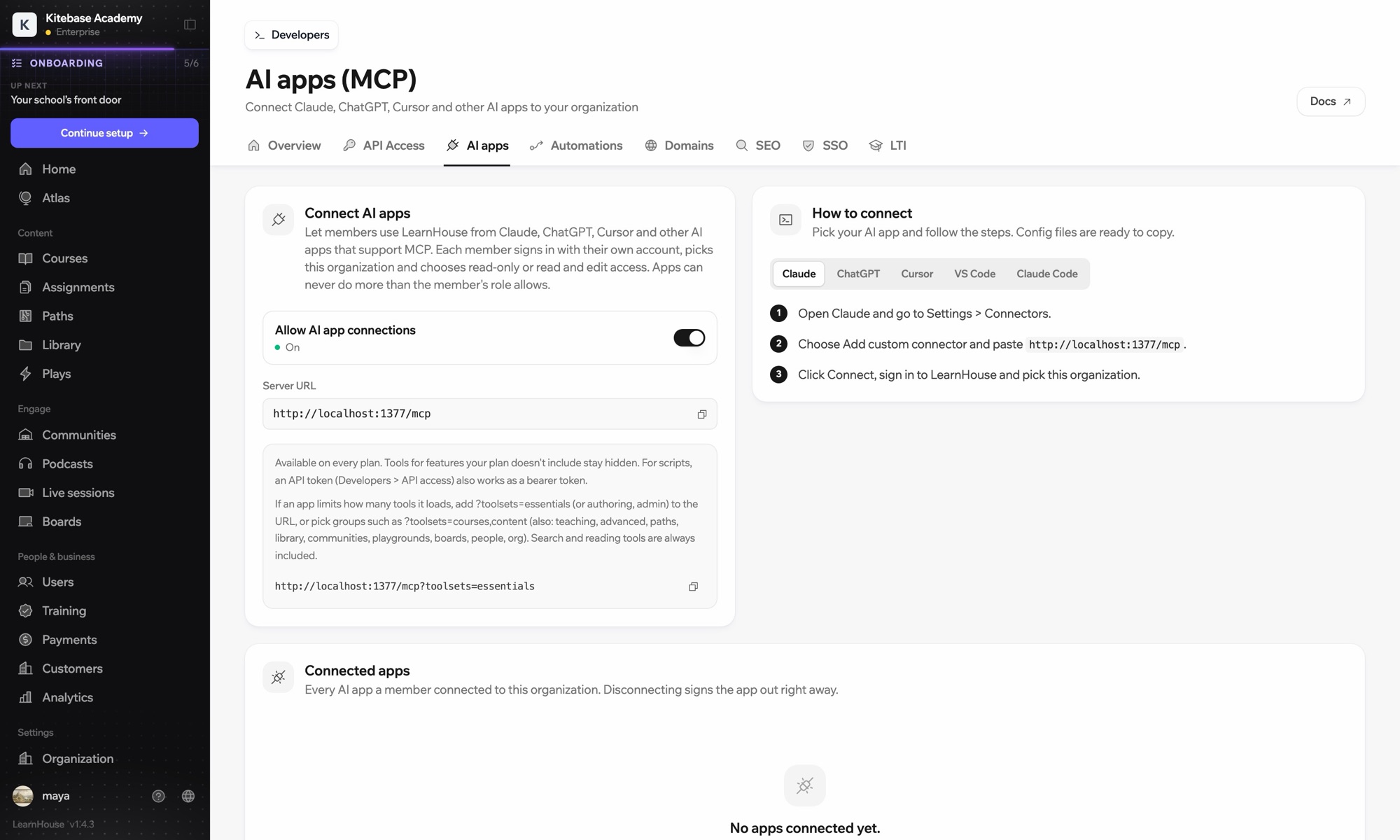
LearnHouse connects to VS Code through its MCP server, added in VS Code as an HTTP server. Once you sign in, the AI chat in VS Code can look up courses, edit lessons and read learner progress, limited to what your LearnHouse role allows.

Cara terhubung
Server MCP LearnHouse
Paket
Pro ke atas
Halaman LearnHouse terkait
Tanya Atlas
ProServer MCP LearnHouseAplikasi AIOtomasi
Yang bisa Anda lakukan

Apa yang dilakukan VS Code untuk Anda

Server MCP

Keep docs and lessons in step

Ask the chat to update the lesson that explains a function you just changed in the code beside it.
01 / 3
Hubungkan Claude atau ChatGPT lewat MCP
Claude · LearnHouse terhubung
Siapa yang tersendat di Seller Bootcamp?
learnhouse · list_learners
3 peserta belum membuka bab 2 selama 14 hari. Mau saya kirimkan pengingat?
Ya, kirim.
Pengaturan

Siap dipakai dalam hitungan menit

  1. 1

    Add the server

    Run the command MCP: Add Server and choose HTTP.

  2. 2

    Paste the URL

    Use the server URL shown under Connect AI apps in your LearnHouse dashboard and give it a name.

  3. 3

    Sign in

    Start the server. VS Code opens LearnHouse so you can sign in and pick the organization.

Termasuk di

Promulai $143/bulan, ditagih tahunan

The API and MCP server come with Pro on LearnHouse Cloud.

Mulai uji coba 14 hariBandingkan paket
FAQ

Pertanyaan seputar VS Code

Does VS Code need an API token?

No. It signs in through your browser. An API token also works as a bearer token if you prefer scripts.

Can it delete courses?

It can only do what your LearnHouse role allows, and you choose read-only or read and edit access when you connect.

My app loads too many tools. What can I do?

Add ?toolsets=essentials to the server URL, or name the groups you need, such as ?toolsets=courses,content.

Cocok dipadukan dengan

Claude CodeConnect Claude Code to your academy with one terminal command.CursorUse LearnHouse from Cursor and other MCP clients.AnthropicClaudeRun your academy from Claude with the LearnHouse MCP server.OpenAIChatGPTBuild and manage courses from ChatGPT through MCP.Google GeminiGoogle GeminiThe AI behind LearnHouse AI, already powering your platform.SlackSlackPost course completions and new sign-ups to Slack through the LearnHouse Zapier app.
Hubungkan alat Anda di minggu pertama

Hubungkan alat Anda di minggu pertama

Coba paket mana pun gratis selama 14 hari. Tanpa kartu kredit, biaya platform 0%, dan integrasi sudah termasuk.

Mulai uji coba gratis

Atau self-host edisi open source secara gratis