LearnHouse
시작하기
LearnHouse
AI엔터프라이즈개발자모바일요금제
GitHub...
로그인시작하기

새로운 세대를 위한 모던 오픈소스 학습 플랫폼

XGitHubLinkedInDiscord

제품

  • 크리에이터
  • 교육기관
  • 엔터프라이즈
  • 개발자
  • 모바일 앱
  • 오픈소스
  • 디자인
  • 검색 노출
  • 요금제

기능

  • 강좌
  • AI
  • 결제
  • 커뮤니티
  • 팟캐스트
  • 보드
  • Plays
  • 코드
  • 분석
  • 동영상 강좌
  • 뉴스레터
  • 라이브 세션
  • 학습 경로
  • 순차 공개
  • 과제
  • 수료증
  • 시나리오
  • 필수 교육
  • 강좌 번역
  • 연동

리소스

  • 문서
  • 유니버시티
  • 블로그
  • 업데이트 내역
  • 셀프 호스팅
  • 용어집
  • GitHub
  • 플랫폼 비교

회사

  • 문의
  • 보안
  • 산업별

회사

  • 문의
  • 보안
  • 산업별

LearnHouse 비교

  • Udemy
  • Moodle
  • Teachable
  • Open edX
  • Thinkific
  • Canvas
  • Kajabi
  • Skool
  • Podia
  • Coursera
  • 전체 비교

대안

  • Udemy
  • Teachable
  • Thinkific
  • Kajabi
  • Skool
  • Podia
  • Coursera
  • Moodle
  • Open edX
  • Canvas LMS
  • Skillshare
  • Mighty Networks
  • LearnWorlds
  • Circle
버그나 문제를 발견하셨나요?
Open Source Initiative

오픈소스

AGPLv3 라이선스, 셀프호스팅 가능

GDPR 대응

EU 데이터 보호 규정 준수

G2

G2

G2에서 리뷰 남기기

© 2026 LearnHouse, Inc.

  • 개인정보처리방침
  • 이용약관
  • 쿠키 정책
전체 연동

Use WorkOS with LearnHouse: SAML or OIDC SSOLet IT connect SAML on its own

WorkOS brokers SAML and OIDC connections and gives your identity team a portal to finish the setup themselves.

무료 체험 시작

14일 무료 · 카드 등록 불필요

LearnHouse connects to identity providers through WorkOS, one of its two SSO providers next to Custom OIDC. WorkOS handles SAML and OIDC connections and offers a setup portal, so the person who manages your identity provider can configure it without access to LearnHouse settings.

연결 방식
WorkOS를 통한 SAML 또는 OIDC
플랜
Business 이상
관련 LearnHouse 페이지
SSO 및 LTI
BusinessWorkOS를 통한 SAML 또는 OIDC인증 및 SSO
할 수 있는 일

WorkOS 활용법

SSO 및 LTI

SAML when you need it

Teams whose identity provider only speaks SAML can still use single sign-on through WorkOS.
01 / 3
싱글 사인온 설정
Okta로 로그인
Canvas · LTI 1.3
SCIM: 사용자 248명 동기화됨
설정

몇 분이면 설정 끝

  1. 1

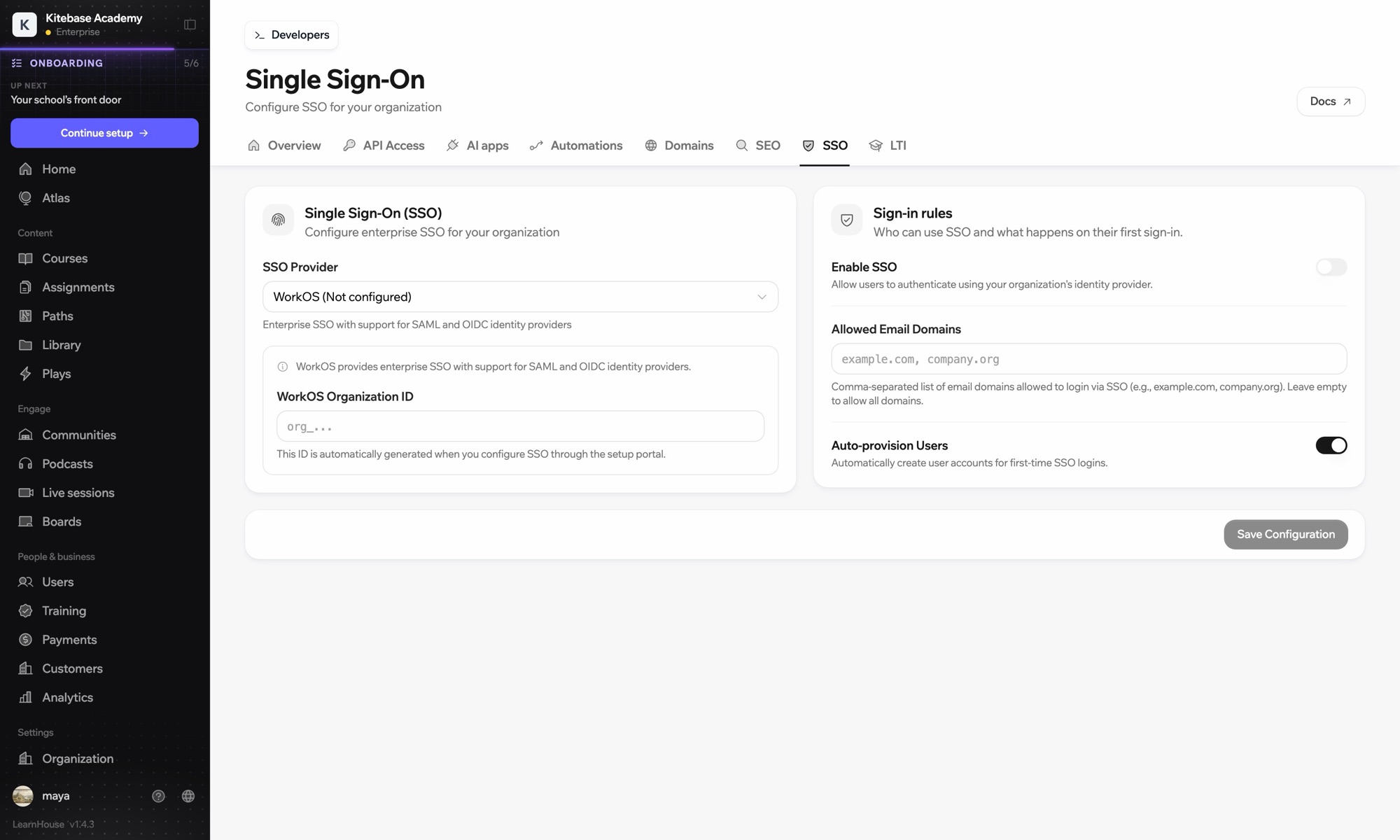
    Choose WorkOS

    In Organization → SSO, choose WorkOS as the provider.

  2. 2

    Open the setup portal

    Generate the portal link from LearnHouse and open it, or send it to the person who runs your identity provider.

  3. 3

    Connect the identity provider

    Follow the steps for your provider in the portal, then test a sign-in.

포함된 플랜

Business연간 결제 시 월 $319부터

SSO is part of Business and Enterprise.

14일 체험 시작플랜 비교
자주 묻는 질문

WorkOS 관련 질문

When should I pick WorkOS over Custom OIDC?

Pick WorkOS when your provider uses SAML or when your IT team wants its own setup portal. Custom OIDC connects directly without a broker.

Do self-hosted academies need their own WorkOS account?

Yes, a self-hosted Enterprise Edition uses your own WorkOS credentials.

함께 쓰기 좋은 도구

OktaOktaSingle sign-on with Okta over OpenID Connect.Ping IdentitySingle sign-on with Ping Identity over OpenID Connect.Microsoft Entra IDSingle sign-on with Microsoft Entra ID (Azure AD) over OpenID Connect.GoogleGoogle sign-inLet learners sign in with their Google account.GoogleGoogle WorkspaceGoogle sign-in and OIDC single sign-on for your school or company domain.KeycloakKeycloakOpen-source SSO with Keycloak over OpenID Connect.
첫 주에 쓰던 도구를 연결하세요

첫 주에 쓰던 도구를 연결하세요

어떤 플랜이든 14일 동안 무료로 써 보세요. 카드 등록 없이, 플랫폼 수수료 0%, 연동도 모두 포함돼요.

무료 체험 시작

또는 오픈소스 에디션을 무료로 셀프호스팅하세요