LearnHouse
Aan de slag
LearnHouse
AIEnterpriseOntwikkelaarsMobielPrijzen
GitHub...
InloggenAan de slag

Het moderne open-source leerplatform

XGitHubLinkedInDiscord

Product

  • Makers
  • Onderwijs
  • Enterprise
  • Ontwikkelaars
  • Mobiele app
  • Open source
  • Ontwerp
  • Vindbaarheid
  • Prijzen

Functies

  • Cursussen
  • AI
  • Betalingen
  • Community's
  • Podcasts
  • Borden
  • Plays
  • Code
  • Analyses
  • Videocursussen
  • Nieuwsbrief
  • Livesessies
  • Leerpaden
  • Gefaseerde content
  • Opdrachten
  • Certificaten
  • Scenario's
  • Verplichte trainingen
  • Cursusvertaling
  • Integraties

Hulpbronnen

  • Documentatie
  • Universiteit
  • Blog
  • Changelog
  • Zelf hosten
  • Woordenlijst
  • GitHub
  • Platforms vergelijken

Bedrijf

  • Contact
  • Beveiliging
  • Branches

Bedrijf

  • Contact
  • Beveiliging
  • Branches

Vergelijk LearnHouse met

  • Udemy
  • Moodle
  • Teachable
  • Open edX
  • Thinkific
  • Canvas
  • Kajabi
  • Skool
  • Podia
  • Coursera
  • Alle vergelijkingen

Alternatieven voor

  • Udemy
  • Teachable
  • Thinkific
  • Kajabi
  • Skool
  • Podia
  • Coursera
  • Moodle
  • Open edX
  • Canvas LMS
  • Skillshare
  • Mighty Networks
  • LearnWorlds
  • Circle
Een bug of probleem gevonden?
Open Source Initiative

Open source

AGPLv3-licentie, zelf te hosten

AVG-proof

Voldoet aan de EU-regels voor gegevensbescherming

G2

G2

Beoordeel ons op G2

© 2026 LearnHouse, Inc.

  • Privacy
  • Voorwaarden
  • Cookiebeleid
Alle integraties

Use VS Code with LearnHouse: Edit Courses in ChatEdit your courses without leaving the editor

VS Code talks to LearnHouse over MCP, so the chat panel can read and change your academy while you work on code next to it.

Start gratis proefperiode

14 dagen gratis · Geen creditcard

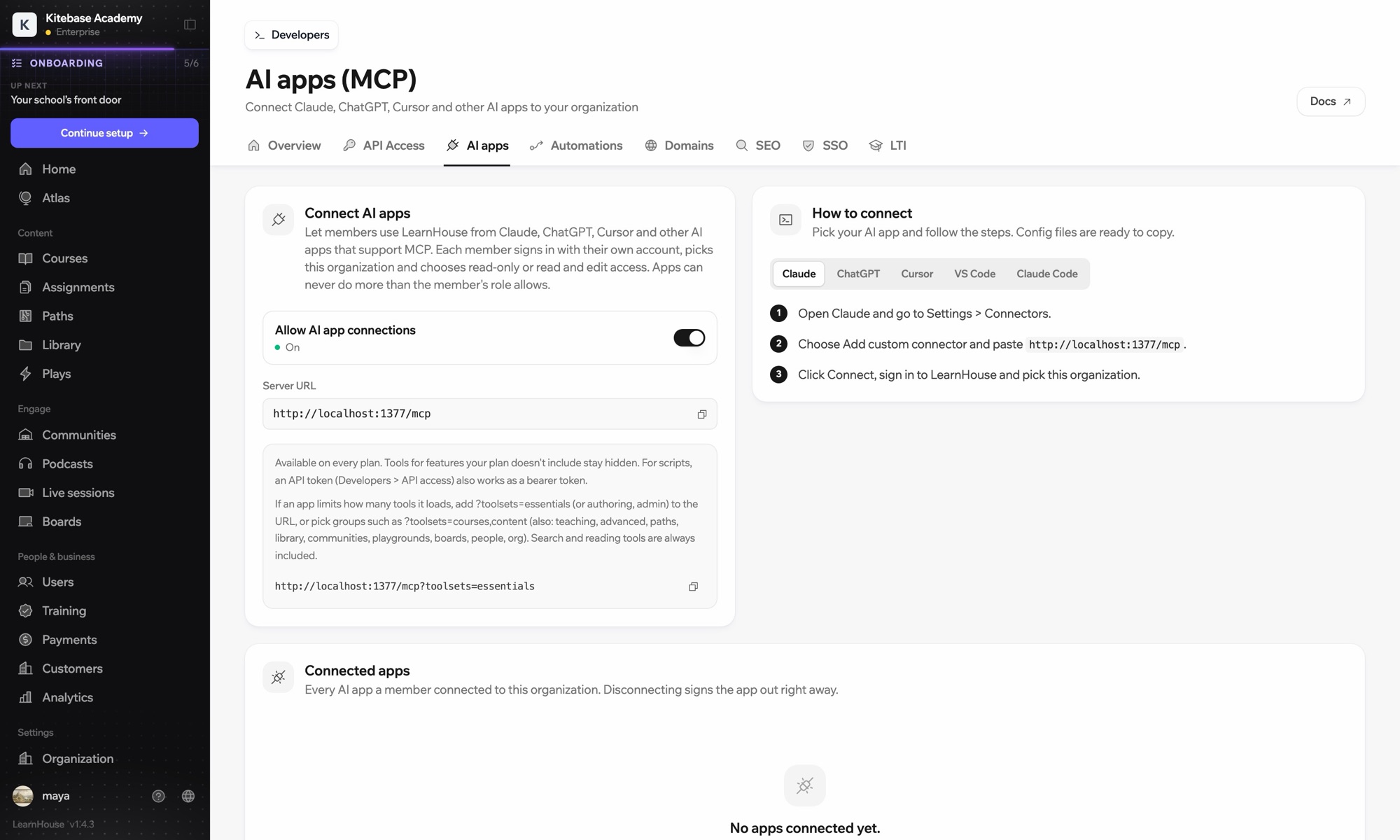
LearnHouse connects to VS Code through its MCP server, added in VS Code as an HTTP server. Once you sign in, the AI chat in VS Code can look up courses, edit lessons and read learner progress, limited to what your LearnHouse role allows.

Hoe het koppelt
LearnHouse MCP-server
Abonnement
Pro en hoger
Bijbehorende LearnHouse-pagina
Vraag het Atlas
ProLearnHouse MCP-serverAI-appsAutomatisering
Wat je ermee kunt doen

Wat VS Code voor jou doet

MCP-server

Keep docs and lessons in step

Ask the chat to update the lesson that explains a function you just changed in the code beside it.
01 / 3
Claude of ChatGPT verbinden via MCP
Claude · LearnHouse verbonden
Wie zit vast in Seller Bootcamp?
learnhouse · list_learners
3 cursisten hebben hoofdstuk 2 al 14 dagen niet geopend. Zal ik ze een herinnering sturen?
Ja, stuur maar.
Instellen

In een paar minuten ingesteld

  1. 1

    Add the server

    Run the command MCP: Add Server and choose HTTP.

  2. 2

    Paste the URL

    Use the server URL shown under Connect AI apps in your LearnHouse dashboard and give it a name.

  3. 3

    Sign in

    Start the server. VS Code opens LearnHouse so you can sign in and pick the organization.

Inbegrepen bij

Provanaf $143/mnd, jaarlijks gefactureerd

The API and MCP server come with Pro on LearnHouse Cloud.

Start de proefperiode van 14 dagenAbonnementen vergelijken
Veelgestelde vragen

Vragen over VS Code

Does VS Code need an API token?

No. It signs in through your browser. An API token also works as a bearer token if you prefer scripts.

Can it delete courses?

It can only do what your LearnHouse role allows, and you choose read-only or read and edit access when you connect.

My app loads too many tools. What can I do?

Add ?toolsets=essentials to the server URL, or name the groups you need, such as ?toolsets=courses,content.

Past goed bij

Claude CodeConnect Claude Code to your academy with one terminal command.CursorUse LearnHouse from Cursor and other MCP clients.AnthropicClaudeRun your academy from Claude with the LearnHouse MCP server.OpenAIChatGPTBuild and manage courses from ChatGPT through MCP.Google GeminiGoogle GeminiThe AI behind LearnHouse AI, already powering your platform.SlackSlackPost course completions and new sign-ups to Slack through the LearnHouse Zapier app.
Koppel je tools in je eerste week

Koppel je tools in je eerste week

Probeer elk abonnement 14 dagen gratis. Geen creditcard, 0% platformkosten en integraties inbegrepen.

Start gratis proefperiode

Of host de open-source editie gratis zelf