LearnHouse
Mulai Sekarang
LearnHouse
AIEnterpriseDeveloperSelulerHarga
GitHub...
MasukMulai Sekarang

Platform belajar open source modern generasi berikutnya

XGitHubLinkedInDiscord

Produk

  • Kreator
  • Akademik
  • Enterprise
  • Developer
  • Aplikasi seluler
  • Open source
  • Desain
  • Mudah ditemukan
  • Harga

Fitur

  • Kursus
  • AI
  • Pembayaran
  • Komunitas
  • Podcast
  • Board
  • Plays
  • Kode
  • Analitik
  • Kursus video
  • Newsletter
  • Sesi live
  • Jalur belajar
  • Konten bertahap
  • Tugas
  • Sertifikat
  • Skenario
  • Pelatihan wajib
  • Terjemahan kursus
  • Integrasi

Sumber Daya

  • Dokumentasi
  • Universitas
  • Blog
  • Changelog
  • Self-hosting
  • Glosarium
  • GitHub
  • Bandingkan platform

Perusahaan

  • Kontak
  • Keamanan
  • Industri

Perusahaan

  • Kontak
  • Keamanan
  • Industri

Bandingkan LearnHouse dengan

  • Udemy
  • Moodle
  • Teachable
  • Open edX
  • Thinkific
  • Canvas
  • Kajabi
  • Skool
  • Podia
  • Coursera
  • Semua perbandingan

Alternatif untuk

  • Udemy
  • Teachable
  • Thinkific
  • Kajabi
  • Skool
  • Podia
  • Coursera
  • Moodle
  • Open edX
  • Canvas LMS
  • Skillshare
  • Mighty Networks
  • LearnWorlds
  • Circle
Menemukan bug atau masalah?
Open Source Initiative

Open Source

Lisensi AGPLv3, bisa di-host sendiri

Siap GDPR

Mematuhi aturan perlindungan data UE

G2

G2

Beri ulasan di G2

© 2026 LearnHouse, Inc.

  • Privasi
  • Ketentuan
  • Kebijakan Cookie
Semua integrasi

Use Microsoft Teams with LearnHouse: Live ClassesTraining on Teams, tracked like a course

Schedule a live session in LearnHouse, add your Teams meeting link, and keep reminders, attendance and the recording with the course.

Mulai uji coba gratis

Gratis 14 hari · Tanpa kartu kredit

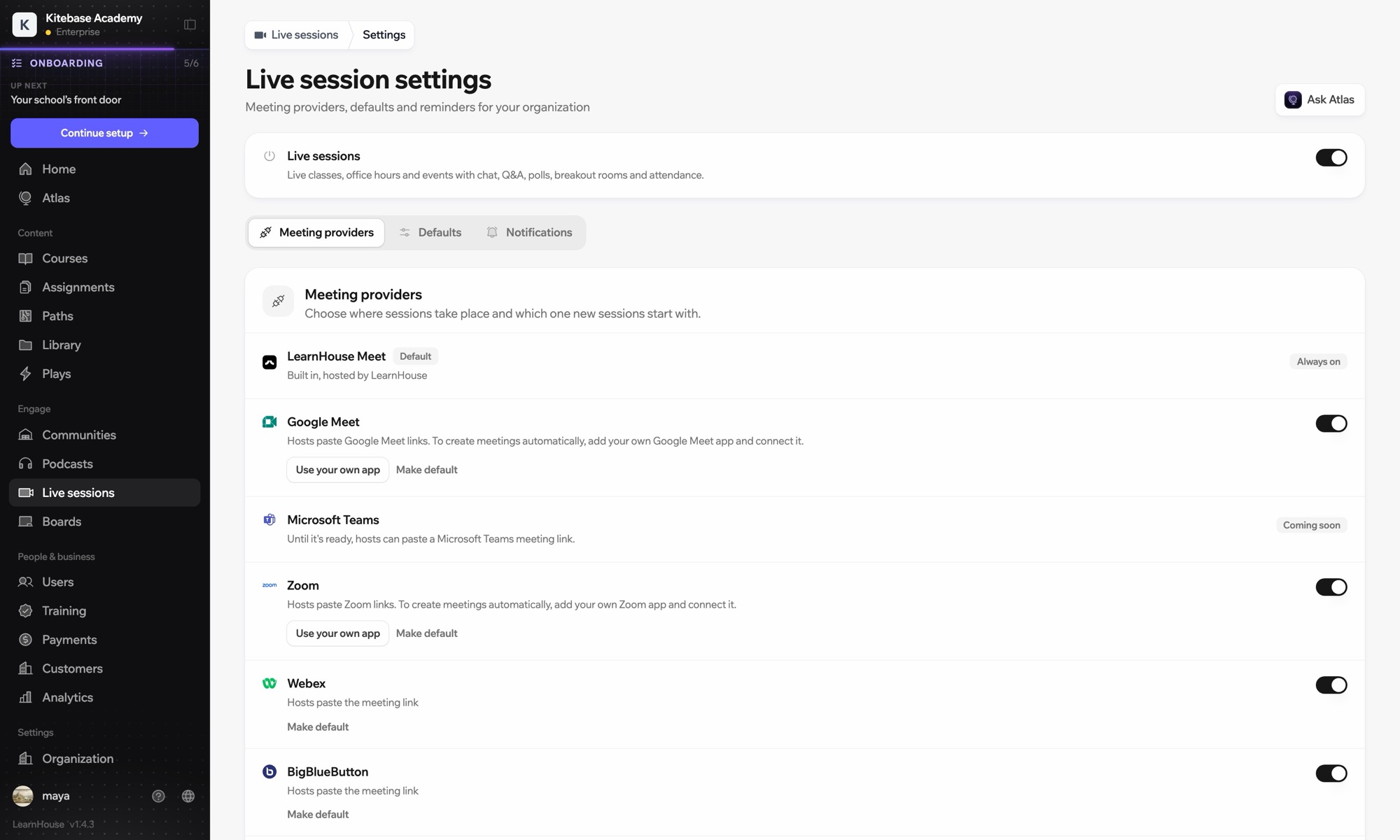
Microsoft Teams works with LearnHouse live sessions by link or through a connected Microsoft 365 account. Connected, each session is an Outlook event with a Teams meeting, and attendance reports, recordings and transcripts come back.

Cara terhubung
Penyedia sesi langsung
Paket
Business ke atas
Halaman LearnHouse terkait
Sesi live
BusinessPenyedia sesi langsungKelas liveKomunikasi
Yang bisa Anda lakukan

Apa yang dilakukan Microsoft Teams untuk Anda

Sesi live

Meetings and Outlook invites made for you

Connect a Microsoft 365 account and each session becomes an Outlook event with a Teams meeting. People who RSVP get the invite.
01 / 4
Penyedia sesi live: Zoom, Google Meet, Teams
MC
LH
SP
LIVE · Jam konsultasi24 menonton
Ringkasan AI dari rekaman
Pengaturan

Siap dipakai dalam hitungan menit

  1. 1

    Connect Microsoft 365

    An admin opens Live sessions → Settings, adds the Microsoft app details and connects the account.

  2. 2

    Schedule a session

    Choose Microsoft Teams; LearnHouse creates the Outlook event with the Teams link.

  3. 3

    Teach

    Learners join from the session page or the invite. Chat, Q&A and polls stay on the session page.

  4. 4

    Review attendance

    Attendance, recordings and transcripts sync back after the meeting.

Termasuk di

Businessmulai $319/bulan, ditagih tahunan

Live sessions are included in Business.

Mulai uji coba 14 hariBandingkan paket
FAQ

Pertanyaan seputar Microsoft Teams

Can hosts just paste a Teams link?

Yes. Without a connected account, paste a teams.microsoft.com link; attendance and recordings then aren't imported automatically.

Can attendees see each other on the invite?

No. Attendees are hidden from each other on the Outlook event.

Can a session move without confusing people?

Yes. Reschedules and cancellations flow through Outlook and Teams to everyone invited.

Cocok dipadukan dengan

Microsoft Entra IDSingle sign-on with Microsoft Entra ID (Azure AD) over OpenID Connect.ZoomZoomEmbed Zoom links for live classes and webinars.WebexWebexHost LearnHouse live sessions with Webex links.Google MeetGoogle MeetEmbed Google Meet links for live video sessions.BigBlueButtonBigBlueButtonRun live sessions in BigBlueButton rooms and keep the session page in LearnHouse.Outlook CalendarAdd live sessions to Outlook, or send invites from a connected Microsoft 365 calendar.
Hubungkan alat Anda di minggu pertama

Hubungkan alat Anda di minggu pertama

Coba paket mana pun gratis selama 14 hari. Tanpa kartu kredit, biaya platform 0%, dan integrasi sudah termasuk.

Mulai uji coba gratis

Atau self-host edisi open source secara gratis