LearnHouse
시작하기
LearnHouse
AI엔터프라이즈개발자모바일요금제
GitHub...
로그인시작하기

새로운 세대를 위한 모던 오픈소스 학습 플랫폼

XGitHubLinkedInDiscord

제품

  • 크리에이터
  • 교육기관
  • 엔터프라이즈
  • 개발자
  • 모바일 앱
  • 오픈소스
  • 디자인
  • 검색 노출
  • 요금제

기능

  • 강좌
  • AI
  • 결제
  • 커뮤니티
  • 팟캐스트
  • 보드
  • Plays
  • 코드
  • 분석
  • 동영상 강좌
  • 뉴스레터
  • 라이브 세션
  • 학습 경로
  • 순차 공개
  • 과제
  • 수료증
  • 시나리오
  • 필수 교육
  • 강좌 번역
  • 연동

리소스

  • 문서
  • 유니버시티
  • 블로그
  • 업데이트 내역
  • 셀프 호스팅
  • 용어집
  • GitHub
  • 플랫폼 비교

회사

  • 문의
  • 보안
  • 산업별

회사

  • 문의
  • 보안
  • 산업별

LearnHouse 비교

  • Udemy
  • Moodle
  • Teachable
  • Open edX
  • Thinkific
  • Canvas
  • Kajabi
  • Skool
  • Podia
  • Coursera
  • 전체 비교

대안

  • Udemy
  • Teachable
  • Thinkific
  • Kajabi
  • Skool
  • Podia
  • Coursera
  • Moodle
  • Open edX
  • Canvas LMS
  • Skillshare
  • Mighty Networks
  • LearnWorlds
  • Circle
버그나 문제를 발견하셨나요?
Open Source Initiative

오픈소스

AGPLv3 라이선스, 셀프호스팅 가능

GDPR 대응

EU 데이터 보호 규정 준수

G2

G2

G2에서 리뷰 남기기

© 2026 LearnHouse, Inc.

  • 개인정보처리방침
  • 이용약관
  • 쿠키 정책
전체 연동
Anthropic

Use Claude with LearnHouse: Build Courses by ChatAsk Claude to build the course. It shows up in your academy.

The LearnHouse MCP server gives Claude safe access to your organization, so you can create courses, edit lessons and pull learner data from a chat.

무료 체험 시작

14일 무료 · 카드 등록 불필요

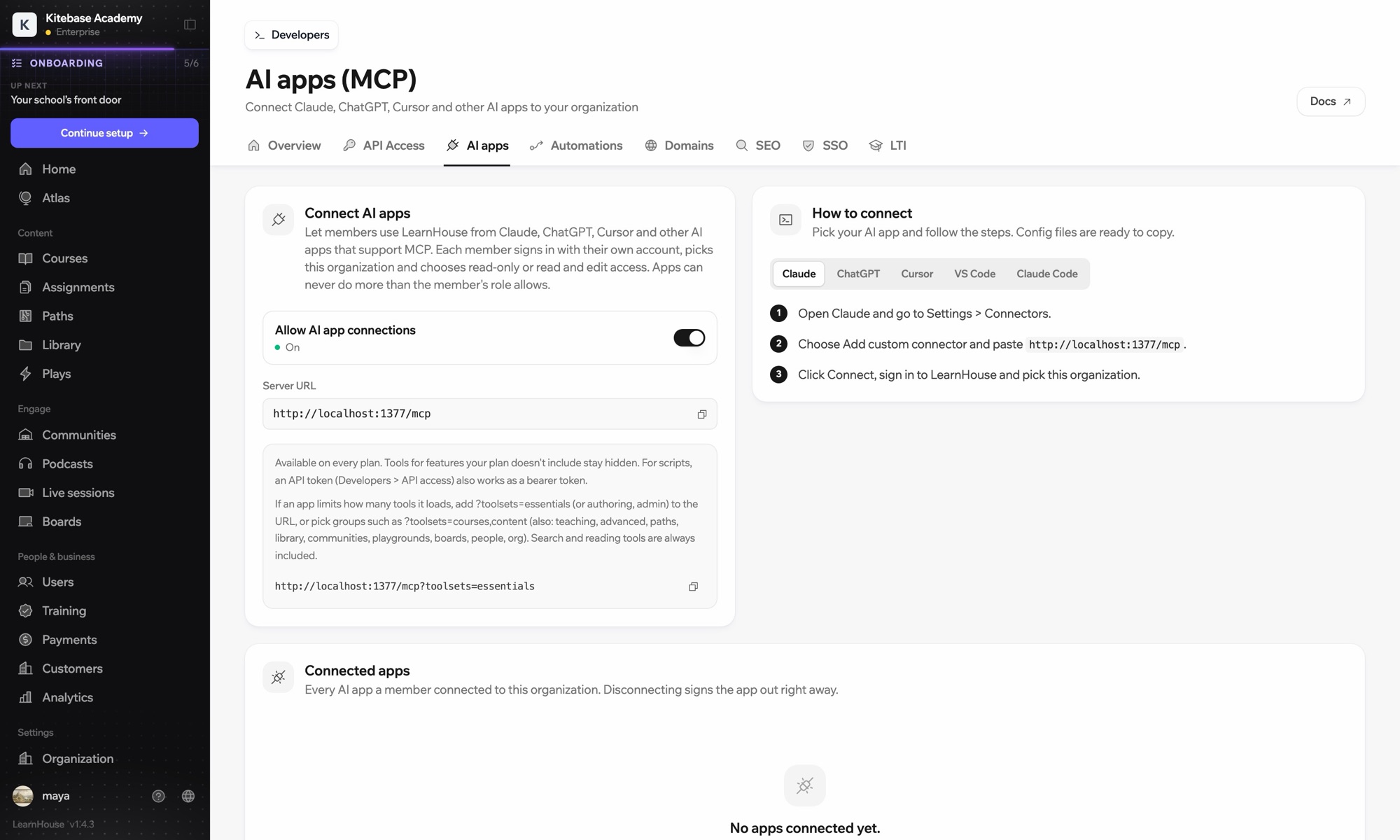
Claude reaches your LearnHouse academy through the LearnHouse MCP server, added in Claude as a custom connector. After you sign in, Claude can create courses, edit lessons and read learner data, never beyond what your own role allows.

연결 방식
LearnHouse MCP 서버
플랜
Pro 이상
관련 LearnHouse 페이지
Atlas에게 묻기
ProLearnHouse MCP 서버AI 앱자동화
할 수 있는 일

Claude 활용법

MCP 서버

Draft a full course from a conversation

Describe the course and Claude creates the chapters, lessons and quizzes in LearnHouse for you to review.
01 / 4
MCP로 Claude나 ChatGPT 연결하기
Claude · LearnHouse 연결됨
Seller Bootcamp에서 막힌 사람은 누구야?
learnhouse · list_learners
학습자 3명이 14일 동안 2장을 열지 않았어요. 알림을 보낼까요?
응, 보내 줘.
설정

몇 분이면 설정 끝

  1. 1

    Copy the server URL

    In your LearnHouse dashboard, open Connect AI apps and copy the server URL.

  2. 2

    Add a connector

    In Claude, go to Settings → Connectors, choose Add custom connector and paste the URL.

  3. 3

    Sign in

    Click Connect, sign in to LearnHouse and pick your organization.

  4. 4

    Start asking

    Ask Claude to create, edit or look things up. Changes appear in your academy.

포함된 플랜

Pro연간 결제 시 월 $143부터

The API and MCP server are included from the Pro plan.

14일 체험 시작플랜 비교
자주 묻는 질문

Claude 관련 질문

What is MCP?

Model Context Protocol is an open standard that lets AI assistants like Claude use outside tools. LearnHouse runs an MCP server so Claude can read and change your academy when you ask it to.

Can Claude change things without asking?

Claude only acts when you ask it to in the chat, and only with the access you approved for your account.

Which Claude apps work?

Any Claude app that supports custom MCP connectors, including Claude desktop and claude.ai. Claude Code works too.

Is my course content used to train Claude?

LearnHouse only sends Claude what it needs to answer your request. Check Anthropic's data settings for how your conversations are handled.

Can my whole team use it?

Yes. Each admin connects with their own LearnHouse account, so actions follow their role and permissions.

Do I need to code?

No. You paste one URL into Claude and sign in.

함께 쓰기 좋은 도구

OpenAIChatGPTBuild and manage courses from ChatGPT through MCP.CursorUse LearnHouse from Cursor and other MCP clients.Google GeminiGoogle GeminiThe AI behind LearnHouse AI, already powering your platform.VS CodeAdd the LearnHouse MCP server to VS Code and work on courses from the editor.Claude CodeConnect Claude Code to your academy with one terminal command.ZapierZapierUse the official LearnHouse app on Zapier to connect events to other apps.
첫 주에 쓰던 도구를 연결하세요

첫 주에 쓰던 도구를 연결하세요

어떤 플랜이든 14일 동안 무료로 써 보세요. 카드 등록 없이, 플랫폼 수수료 0%, 연동도 모두 포함돼요.

무료 체험 시작

또는 오픈소스 에디션을 무료로 셀프호스팅하세요