LearnHouse
시작하기
LearnHouse
AI엔터프라이즈개발자모바일요금제
GitHub...
로그인시작하기

새로운 세대를 위한 모던 오픈소스 학습 플랫폼

XGitHubLinkedInDiscord

제품

  • 크리에이터
  • 교육기관
  • 엔터프라이즈
  • 개발자
  • 모바일 앱
  • 오픈소스
  • 디자인
  • 검색 노출
  • 요금제

기능

  • 강좌
  • AI
  • 결제
  • 커뮤니티
  • 팟캐스트
  • 보드
  • Plays
  • 코드
  • 분석
  • 동영상 강좌
  • 뉴스레터
  • 라이브 세션
  • 학습 경로
  • 순차 공개
  • 과제
  • 수료증
  • 시나리오
  • 필수 교육
  • 강좌 번역
  • 연동

리소스

  • 문서
  • 유니버시티
  • 블로그
  • 업데이트 내역
  • 셀프 호스팅
  • 용어집
  • GitHub
  • 플랫폼 비교

회사

  • 문의
  • 보안
  • 산업별

회사

  • 문의
  • 보안
  • 산업별

LearnHouse 비교

  • Udemy
  • Moodle
  • Teachable
  • Open edX
  • Thinkific
  • Canvas
  • Kajabi
  • Skool
  • Podia
  • Coursera
  • 전체 비교

대안

  • Udemy
  • Teachable
  • Thinkific
  • Kajabi
  • Skool
  • Podia
  • Coursera
  • Moodle
  • Open edX
  • Canvas LMS
  • Skillshare
  • Mighty Networks
  • LearnWorlds
  • Circle
버그나 문제를 발견하셨나요?
Open Source Initiative

오픈소스

AGPLv3 라이선스, 셀프호스팅 가능

GDPR 대응

EU 데이터 보호 규정 준수

G2

G2

G2에서 리뷰 남기기

© 2026 LearnHouse, Inc.

  • 개인정보처리방침
  • 이용약관
  • 쿠키 정책
전체 연동

Use Microsoft Teams with LearnHouse: Live ClassesTraining on Teams, tracked like a course

Schedule a live session in LearnHouse, add your Teams meeting link, and keep reminders, attendance and the recording with the course.

무료 체험 시작

14일 무료 · 카드 등록 불필요

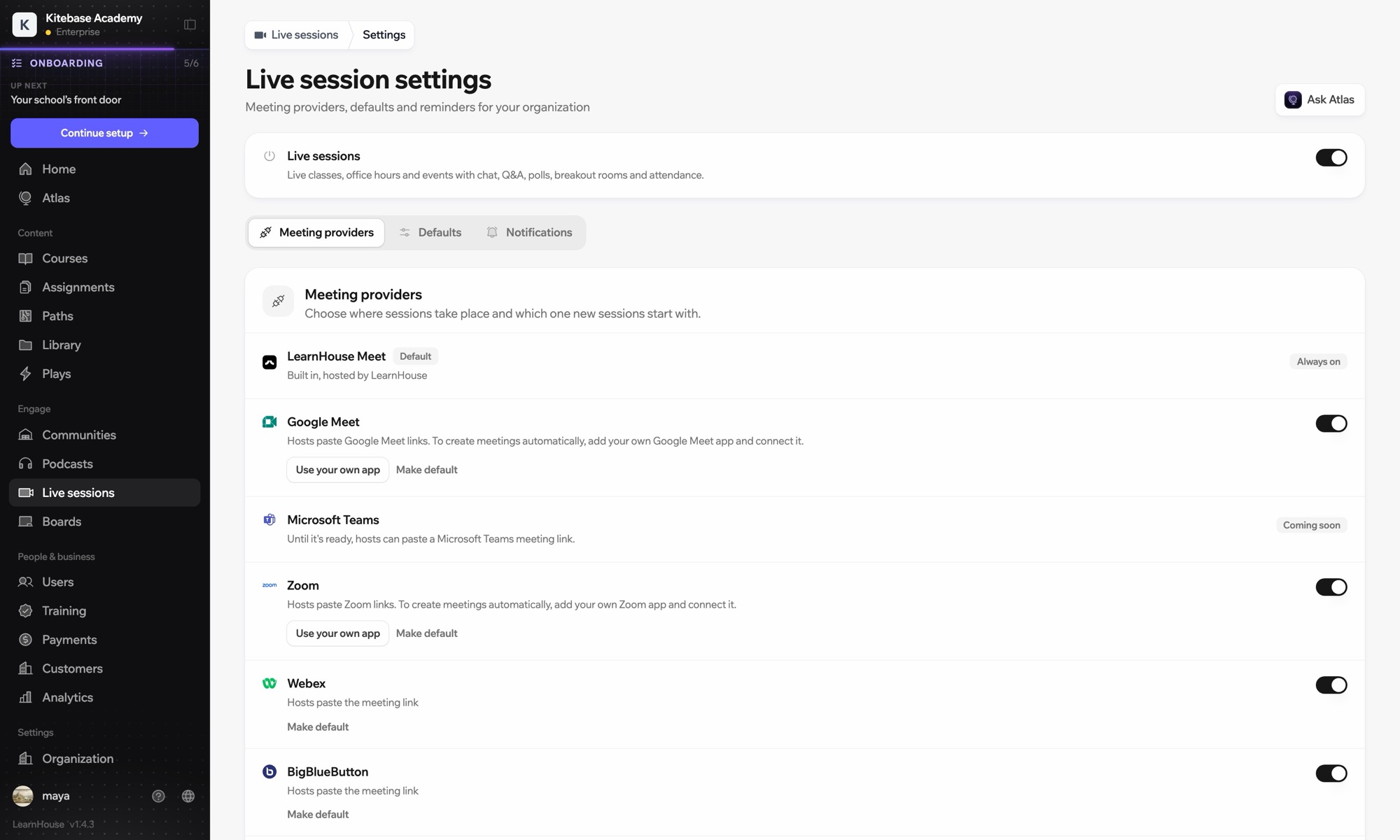
Microsoft Teams works with LearnHouse live sessions by link or through a connected Microsoft 365 account. Connected, each session is an Outlook event with a Teams meeting, and attendance reports, recordings and transcripts come back.

연결 방식
라이브 세션 제공자
플랜
Business 이상
관련 LearnHouse 페이지
라이브 세션
Business라이브 세션 제공자라이브 수업커뮤니케이션
할 수 있는 일

Microsoft Teams 활용법

라이브 세션

Meetings and Outlook invites made for you

Connect a Microsoft 365 account and each session becomes an Outlook event with a Teams meeting. People who RSVP get the invite.
01 / 4
라이브 세션 제공 서비스: Zoom, Google Meet, Teams
MC
LH
SP
라이브 · 오피스 아워24명 시청 중
녹화본 AI 요약
설정

몇 분이면 설정 끝

  1. 1

    Connect Microsoft 365

    An admin opens Live sessions → Settings, adds the Microsoft app details and connects the account.

  2. 2

    Schedule a session

    Choose Microsoft Teams; LearnHouse creates the Outlook event with the Teams link.

  3. 3

    Teach

    Learners join from the session page or the invite. Chat, Q&A and polls stay on the session page.

  4. 4

    Review attendance

    Attendance, recordings and transcripts sync back after the meeting.

포함된 플랜

Business연간 결제 시 월 $319부터

Live sessions are included in Business.

14일 체험 시작플랜 비교
자주 묻는 질문

Microsoft Teams 관련 질문

Can hosts just paste a Teams link?

Yes. Without a connected account, paste a teams.microsoft.com link; attendance and recordings then aren't imported automatically.

Can attendees see each other on the invite?

No. Attendees are hidden from each other on the Outlook event.

Can a session move without confusing people?

Yes. Reschedules and cancellations flow through Outlook and Teams to everyone invited.

함께 쓰기 좋은 도구

Microsoft Entra IDSingle sign-on with Microsoft Entra ID (Azure AD) over OpenID Connect.ZoomZoomEmbed Zoom links for live classes and webinars.WebexWebexHost LearnHouse live sessions with Webex links.Google MeetGoogle MeetEmbed Google Meet links for live video sessions.BigBlueButtonBigBlueButtonRun live sessions in BigBlueButton rooms and keep the session page in LearnHouse.Outlook CalendarAdd live sessions to Outlook, or send invites from a connected Microsoft 365 calendar.
첫 주에 쓰던 도구를 연결하세요

첫 주에 쓰던 도구를 연결하세요

어떤 플랜이든 14일 동안 무료로 써 보세요. 카드 등록 없이, 플랫폼 수수료 0%, 연동도 모두 포함돼요.

무료 체험 시작

또는 오픈소스 에디션을 무료로 셀프호스팅하세요