LearnHouse
เริ่มต้นใช้งาน
LearnHouse
AIEnterpriseนักพัฒนามือถือราคา
GitHub...
เข้าสู่ระบบเริ่มต้นใช้งาน

แพลตฟอร์มการเรียนรู้โอเพนซอร์สยุคใหม่

XGitHubLinkedInDiscord

ผลิตภัณฑ์

  • ครีเอเตอร์
  • สถาบันการศึกษา
  • Enterprise
  • นักพัฒนา
  • แอปมือถือ
  • โอเพนซอร์ส
  • ดีไซน์
  • การถูกค้นพบ
  • ราคา

ฟีเจอร์

  • คอร์ส
  • AI
  • การชำระเงิน
  • ชุมชน
  • พอดแคสต์
  • บอร์ด
  • Plays
  • โค้ด
  • การวิเคราะห์
  • คอร์สวิดีโอ
  • จดหมายข่าว
  • คลาสสด
  • เส้นทางการเรียนรู้
  • ปล่อยเนื้อหาเป็นช่วง
  • งานที่มอบหมาย
  • ใบรับรอง
  • สถานการณ์จำลอง
  • การอบรมภาคบังคับ
  • แปลคอร์ส
  • การเชื่อมต่อ

แหล่งข้อมูล

  • เอกสาร
  • มหาวิทยาลัย
  • บล็อก
  • บันทึกการเปลี่ยนแปลง
  • โฮสต์เอง
  • อภิธานศัพท์
  • GitHub
  • เปรียบเทียบแพลตฟอร์ม

บริษัท

  • ติดต่อ
  • ความปลอดภัย
  • อุตสาหกรรม

บริษัท

  • ติดต่อ
  • ความปลอดภัย
  • อุตสาหกรรม

เปรียบเทียบ LearnHouse กับ

  • Udemy
  • Moodle
  • Teachable
  • Open edX
  • Thinkific
  • Canvas
  • Kajabi
  • Skool
  • Podia
  • Coursera
  • เปรียบเทียบทั้งหมด

ทางเลือกแทน

  • Udemy
  • Teachable
  • Thinkific
  • Kajabi
  • Skool
  • Podia
  • Coursera
  • Moodle
  • Open edX
  • Canvas LMS
  • Skillshare
  • Mighty Networks
  • LearnWorlds
  • Circle
เจอบั๊กหรือปัญหาใช่ไหม?
Open Source Initiative

โอเพนซอร์ส

ใช้สัญญาอนุญาต AGPLv3 โฮสต์เองได้

พร้อมรองรับ GDPR

สอดคล้องกับกฎหมายคุ้มครองข้อมูลของสหภาพยุโรป

G2

G2

รีวิวเราบน G2

© 2026 LearnHouse, Inc.

  • ความเป็นส่วนตัว
  • ข้อกำหนด
  • นโยบายคุกกี้
การเชื่อมต่อทั้งหมด
Anthropic

Use Claude with LearnHouse: Build Courses by ChatAsk Claude to build the course. It shows up in your academy.

The LearnHouse MCP server gives Claude safe access to your organization, so you can create courses, edit lessons and pull learner data from a chat.

ทดลองใช้ฟรี

ฟรี 14 วัน · ไม่ต้องใช้บัตรเครดิต

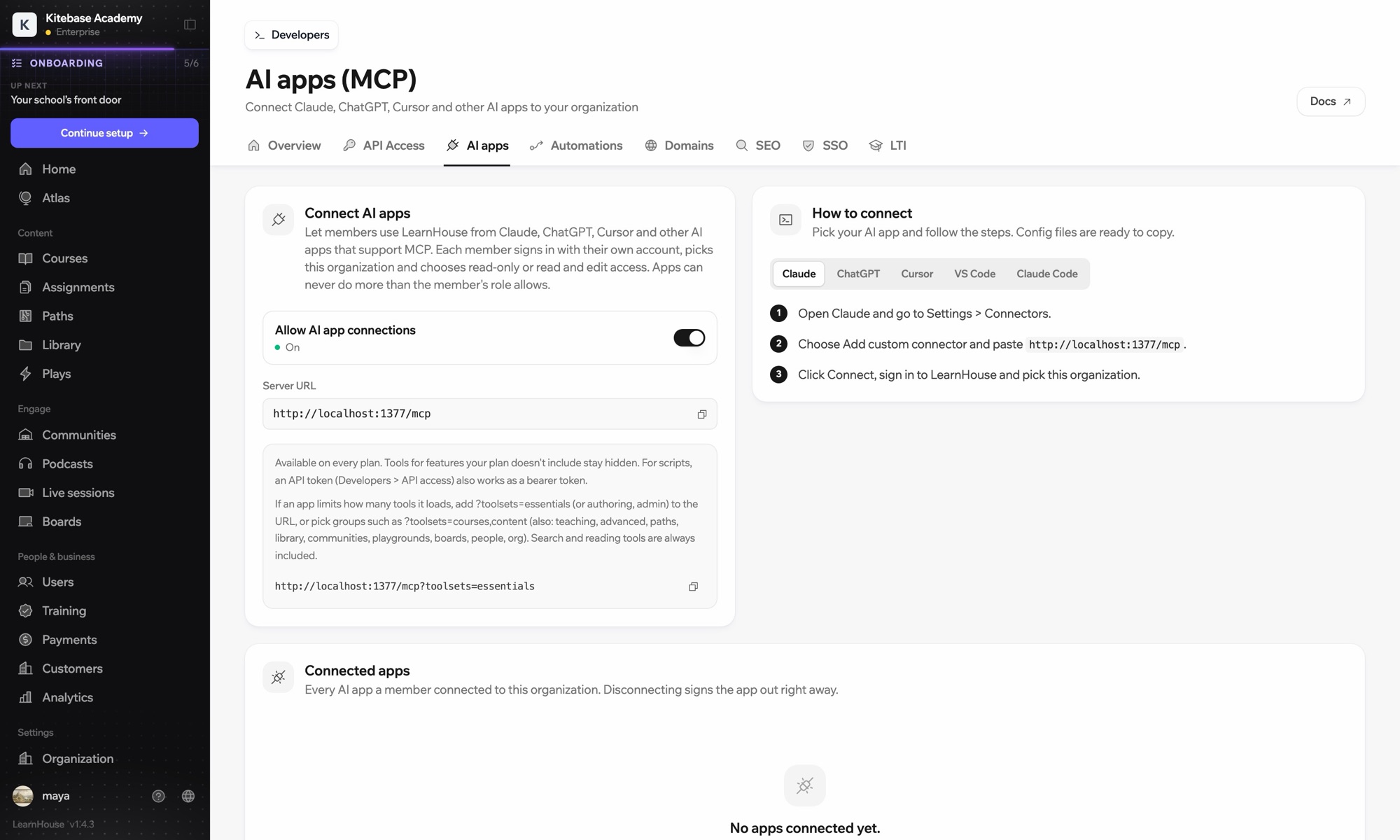
Claude reaches your LearnHouse academy through the LearnHouse MCP server, added in Claude as a custom connector. After you sign in, Claude can create courses, edit lessons and read learner data, never beyond what your own role allows.

วิธีเชื่อมต่อ
เซิร์ฟเวอร์ MCP ของ LearnHouse
แพ็กเกจ
Pro ขึ้นไป
หน้า LearnHouse ที่เกี่ยวข้อง
ถาม Atlas
Proเซิร์ฟเวอร์ MCP ของ LearnHouseแอป AIระบบอัตโนมัติ
คุณทำอะไรได้บ้าง

Claude ช่วยอะไรคุณได้

เซิร์ฟเวอร์ MCP

Draft a full course from a conversation

Describe the course and Claude creates the chapters, lessons and quizzes in LearnHouse for you to review.
01 / 4
เชื่อมต่อ Claude หรือ ChatGPT ผ่าน MCP
Claude · เชื่อมต่อ LearnHouse แล้ว
ใครติดอยู่ใน Seller Bootcamp บ้าง?
learnhouse · list_learners
ผู้เรียน 3 คนไม่ได้เปิดบทที่ 2 มา 14 วันแล้ว ให้ส่งข้อความเตือนไหม?
ได้ ส่งเลย
การตั้งค่า

ตั้งค่าเสร็จในไม่กี่นาที

  1. 1

    Copy the server URL

    In your LearnHouse dashboard, open Connect AI apps and copy the server URL.

  2. 2

    Add a connector

    In Claude, go to Settings → Connectors, choose Add custom connector and paste the URL.

  3. 3

    Sign in

    Click Connect, sign in to LearnHouse and pick your organization.

  4. 4

    Start asking

    Ask Claude to create, edit or look things up. Changes appear in your academy.

รวมอยู่ในแผน

Proเริ่มต้น $143/เดือน ชำระรายปี

The API and MCP server are included from the Pro plan.

เริ่มทดลองใช้ 14 วันเปรียบเทียบแผน
คำถามที่พบบ่อย

คำถามเกี่ยวกับ Claude

What is MCP?

Model Context Protocol is an open standard that lets AI assistants like Claude use outside tools. LearnHouse runs an MCP server so Claude can read and change your academy when you ask it to.

Can Claude change things without asking?

Claude only acts when you ask it to in the chat, and only with the access you approved for your account.

Which Claude apps work?

Any Claude app that supports custom MCP connectors, including Claude desktop and claude.ai. Claude Code works too.

Is my course content used to train Claude?

LearnHouse only sends Claude what it needs to answer your request. Check Anthropic's data settings for how your conversations are handled.

Can my whole team use it?

Yes. Each admin connects with their own LearnHouse account, so actions follow their role and permissions.

Do I need to code?

No. You paste one URL into Claude and sign in.

ใช้ร่วมกับ

OpenAIChatGPTBuild and manage courses from ChatGPT through MCP.CursorUse LearnHouse from Cursor and other MCP clients.Google GeminiGoogle GeminiThe AI behind LearnHouse AI, already powering your platform.VS CodeAdd the LearnHouse MCP server to VS Code and work on courses from the editor.Claude CodeConnect Claude Code to your academy with one terminal command.ZapierZapierUse the official LearnHouse app on Zapier to connect events to other apps.
เชื่อมต่อเครื่องมือของคุณได้ภายในสัปดาห์แรก

เชื่อมต่อเครื่องมือของคุณได้ภายในสัปดาห์แรก

ลองแผนไหนก็ได้ฟรี 14 วัน ไม่ต้องใช้บัตรเครดิต ค่าธรรมเนียมแพลตฟอร์ม 0% และมีการเชื่อมต่อให้ครบ

ทดลองใช้ฟรี

หรือโฮสต์เอดิชันโอเพนซอร์สเองได้ฟรี