LearnHouse
はじめる
LearnHouse
AIエンタープライズ開発者モバイル料金
GitHub...
ログインはじめる

これからの学びのためのオープンソース学習プラットフォーム

XGitHubLinkedInDiscord

製品

  • クリエイター
  • 教育機関
  • エンタープライズ
  • 開発者
  • モバイルアプリ
  • オープンソース
  • デザイン
  • 検索での見つけやすさ
  • 料金

機能

  • コース
  • AI
  • 決済
  • コミュニティ
  • ポッドキャスト
  • ボード
  • Plays
  • コード
  • 分析
  • 動画コース
  • ニュースレター
  • ライブセッション
  • ラーニングパス
  • ドリップ配信
  • 課題
  • 修了証
  • シナリオ
  • 必須研修
  • コース翻訳
  • 連携

リソース

  • ドキュメント
  • ユニバーシティ
  • ブログ
  • 変更履歴
  • セルフホスト
  • 用語集
  • GitHub
  • プラットフォームを比較

会社情報

  • お問い合わせ
  • セキュリティ
  • 業界

会社情報

  • お問い合わせ
  • セキュリティ
  • 業界

LearnHouseと比較

  • Udemy
  • Moodle
  • Teachable
  • Open edX
  • Thinkific
  • Canvas
  • Kajabi
  • Skool
  • Podia
  • Coursera
  • すべての比較

他サービスからの乗り換え

  • Udemy
  • Teachable
  • Thinkific
  • Kajabi
  • Skool
  • Podia
  • Coursera
  • Moodle
  • Open edX
  • Canvas LMS
  • Skillshare
  • Mighty Networks
  • LearnWorlds
  • Circle
バグや不具合を見つけたら
Open Source Initiative

オープンソース

AGPLv3ライセンス、セルフホスト可能

GDPR対応

EUのデータ保護規則に準拠

G2

G2

G2でレビューする

© 2026 LearnHouse, Inc.

  • プライバシー
  • 利用規約
  • Cookieポリシー
すべての連携
Webex

Use Webex with LearnHouse: Live Session LinksKeep Webex, give your classes a home

Schedule live sessions in LearnHouse with your Webex link, so reminders, attendance and recordings sit with the course.

無料トライアルを始める

14日間無料・クレジットカード不要

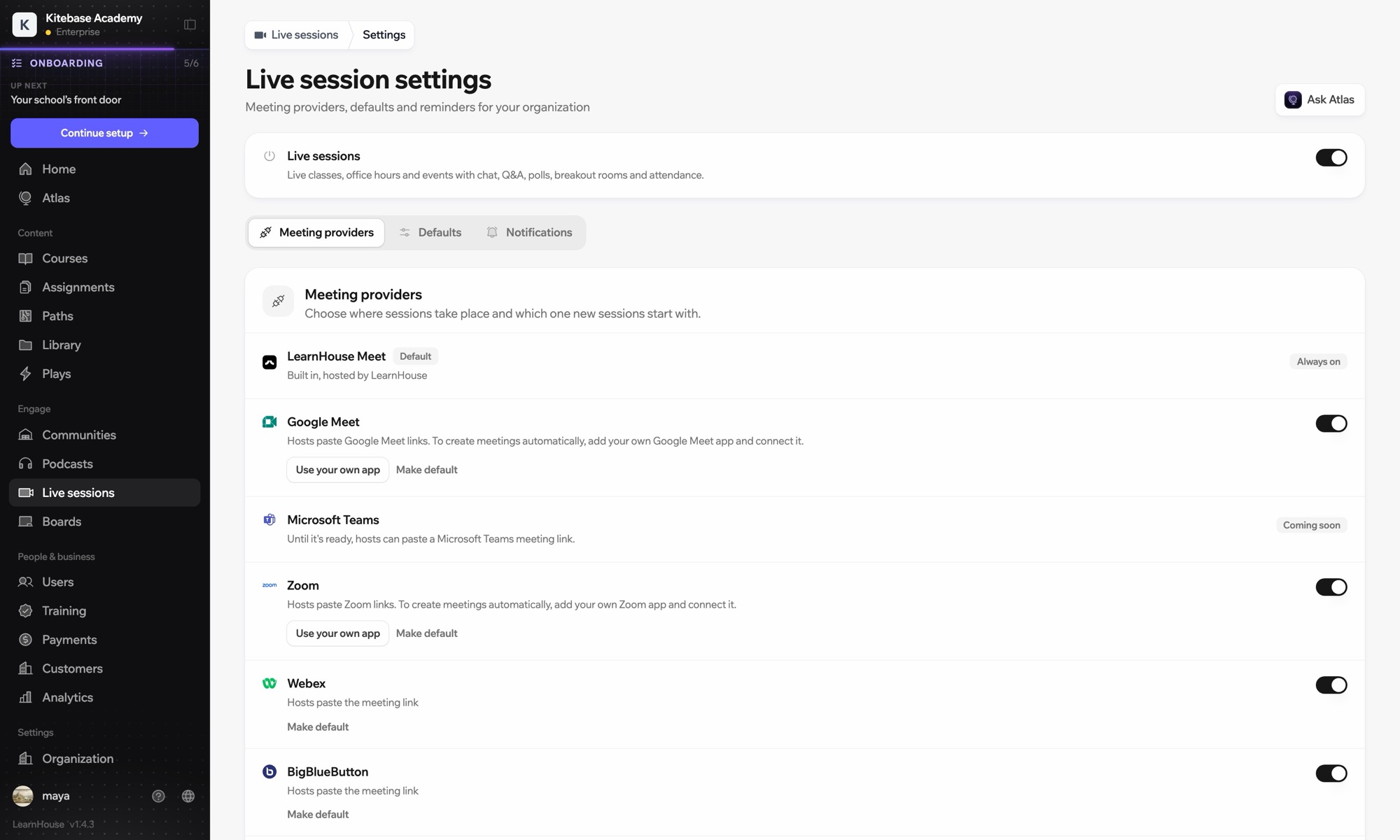
Webex works with LearnHouse live sessions in link mode. The host pastes the Webex link, and LearnHouse provides the session page with reminders, chat, Q&A, polls and attendance around it.

接続方法
ライブセッションのプロバイダー
プラン
Business 以上
関連する LearnHouse のページ
ライブ授業
Businessライブセッションのプロバイダーライブ授業コミュニケーション
できること

Webexでできること

ライブ授業

Bring your Webex link

Webex works in link mode: paste the meeting link and learners join from the session page.
01 / 3
ライブ授業のプロバイダー:Zoom、Google Meet、Teams
MC
LH
SP
ライブ · オフィスアワー24人が視聴中
録画のAI要約
セットアップ

数分で設定できます

  1. 1

    Create the Webex meeting

    Schedule the meeting in Webex and copy its link.

  2. 2

    Schedule in LearnHouse

    Create a live session, choose Webex and paste the link. No account connection is needed.

  3. 3

    Remind and replay

    Learners get reminders, and you add the recording to the session after class.

対象プラン

Business年払いで月額$319から

Live sessions are included in Business.

14日間のトライアルを始めるプランを比較
よくある質問

Webexについてのよくある質問

Does LearnHouse create Webex meetings?

No. Webex is link mode only; Zoom, Google Meet and Teams can create meetings when connected.

Can I mix providers?

Yes. Each session picks its own: LearnHouse Meet, Zoom, Google Meet, Teams, Webex, BigBlueButton or a custom link.

相性のよいツール

ZoomZoomEmbed Zoom links for live classes and webinars.Microsoft TeamsRun LearnHouse live sessions on Microsoft Teams.Google MeetGoogle MeetEmbed Google Meet links for live video sessions.BigBlueButtonBigBlueButtonRun live sessions in BigBlueButton rooms and keep the session page in LearnHouse.Outlook CalendarAdd live sessions to Outlook, or send invites from a connected Microsoft 365 calendar.AppleApple CalendarDownload live sessions as .ics files that open in Apple Calendar.
最初の1週間で、ツールをつなげましょう

最初の1週間で、ツールをつなげましょう

どのプランも14日間無料でお試しいただけます。クレジットカード不要、プラットフォーム手数料0%、連携機能も含まれます。

無料トライアルを始める

オープンソース版を無料でセルフホストすることもできます