LearnHouse
はじめる
LearnHouse
AIエンタープライズ開発者モバイル料金
GitHub...
ログインはじめる

これからの学びのためのオープンソース学習プラットフォーム

XGitHubLinkedInDiscord

製品

  • クリエイター
  • 教育機関
  • エンタープライズ
  • 開発者
  • モバイルアプリ
  • オープンソース
  • デザイン
  • 検索での見つけやすさ
  • 料金

機能

  • コース
  • AI
  • 決済
  • コミュニティ
  • ポッドキャスト
  • ボード
  • Plays
  • コード
  • 分析
  • 動画コース
  • ニュースレター
  • ライブセッション
  • ラーニングパス
  • ドリップ配信
  • 課題
  • 修了証
  • シナリオ
  • 必須研修
  • コース翻訳
  • 連携

リソース

  • ドキュメント
  • ユニバーシティ
  • ブログ
  • 変更履歴
  • セルフホスト
  • 用語集
  • GitHub
  • プラットフォームを比較

会社情報

  • お問い合わせ
  • セキュリティ
  • 業界

会社情報

  • お問い合わせ
  • セキュリティ
  • 業界

LearnHouseと比較

  • Udemy
  • Moodle
  • Teachable
  • Open edX
  • Thinkific
  • Canvas
  • Kajabi
  • Skool
  • Podia
  • Coursera
  • すべての比較

他サービスからの乗り換え

  • Udemy
  • Teachable
  • Thinkific
  • Kajabi
  • Skool
  • Podia
  • Coursera
  • Moodle
  • Open edX
  • Canvas LMS
  • Skillshare
  • Mighty Networks
  • LearnWorlds
  • Circle
バグや不具合を見つけたら
Open Source Initiative

オープンソース

AGPLv3ライセンス、セルフホスト可能

GDPR対応

EUのデータ保護規則に準拠

G2

G2

G2でレビューする

© 2026 LearnHouse, Inc.

  • プライバシー
  • 利用規約
  • Cookieポリシー

Customer Education Platform & Product AcademyTeach customers your product before they need support

A public academy with onboarding courses, how-to lessons and a certification program. Customers find answers on Google, and your team answers fewer of the same questions.

無料で試す

14日間無料 · クレジットカード不要

公開アカデミーとSEOAtlas講座ビルダー修了証講座翻訳MCPサーバーラーニングパス分析
ビフォー・アフター

乗り換えると何が変わるか

これまで

Support answers the same setup questions every week.

LearnHouseなら

A short onboarding course answers them before the ticket is written.

これまで

Help articles that nobody finishes.

LearnHouseなら

Step-by-step lessons with a quiz to check they got it.

これまで

No way to recognise customers who know the product well.

LearnHouseなら

A certification program they can show on LinkedIn.

できること

LearnHouseで運営できること

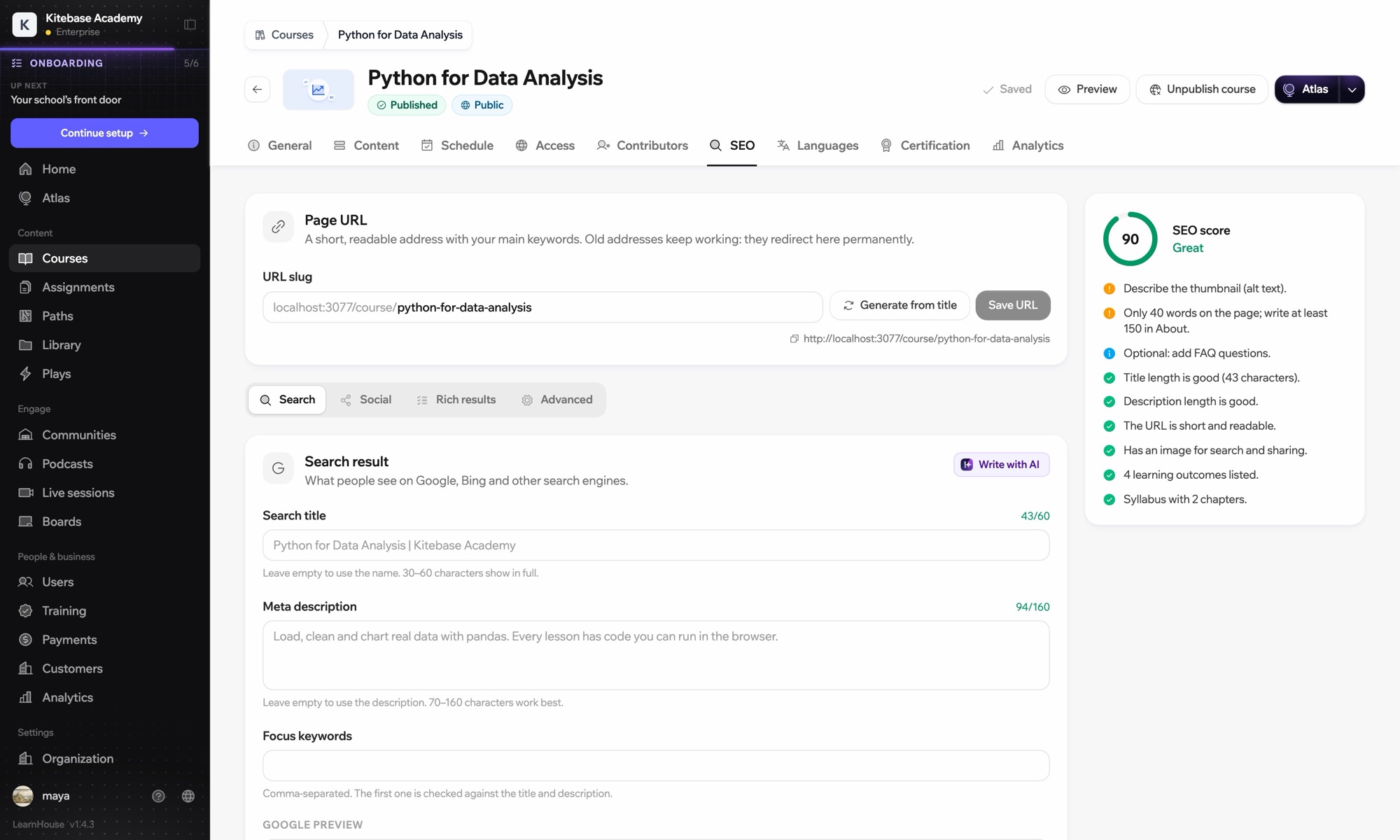
公開アカデミーとSEO

An academy people find on Google

Public course pages are built to show up in search, so a customer looking for how to do something lands on your lesson.
01 / 5
講座のSEO設定
acme sso 設定方法
academy.acme.com › courses › sso-setup
AcmeでSSOを設定:無料講座
クイズと修了証付きの短い6レッスン。
講座6レッスン無料

おすすめプラン

Pro年払いで月額$143から

Pro adds a custom domain for academy.yourcompany.com, learning paths, certificates and the API and MCP server.

14日間無料で試すすべてのプランを比較
導入ステップ

Launch a product academy this quarter

  1. 1

    Draft the onboarding course

    Start from your getting-started docs and let Atlas outline the course.

    Atlas講座ビルダー
  2. 2

    Group courses into tracks

    Admin, everyday user and developer tracks, each with required and elective courses.

    ラーニングパス
  3. 3

    Add certification

    Award a certificate at the end of each track.

    修了証
  4. 4

    See what customers struggle with

    Drop-off per lesson shows where your product, or your course, needs work.

    分析
FAQ

よくいただく質問

Can the academy live on our own domain?

Yes. A custom domain comes with the Pro plan.

Can customers sign in with their existing account?

SSO with your identity provider is on the Business plan. On other plans, customers create a LearnHouse account in your academy.

Can we sell training to customers?

Yes. Charge for courses through your own Stripe account with 0% platform fees, or sell seats to a company on the Business plan.

Can the courses be public for SEO?

Yes. Courses can be public, with search-friendly pages, or private for signed-in customers only.

Can we connect it to our product?

Yes. Pro includes the API and MCP server, and Business adds webhooks and Zapier.

ほかの業種・チームでのLearnHouse

すべて見る
業界団体・協会フランチャイズホテル・レストラン店舗スタッフコーディングブートキャンプソフトウェア企業サイバーセキュリティ研修データサイエンス・AIゲーム開発ヨガ・フィットネス
今週、あなたのスクールを始めよう

今週、あなたのスクールを始めよう

どのプランも14日間無料でお試しいただけます。クレジットカード不要、プラットフォーム手数料0%、コンテンツはずっとあなたのものです。

無料で試す

またはオープンソース版を無料でセルフホスト