LearnHouse
Get Started
LearnHouse
AIEnterpriseDevelopersMobilePricing
GitHub...
LoginGet Started

The next gen modern open source learning platform

XGitHubLinkedInDiscord

Product

  • Creators
  • Academia
  • Enterprise
  • Developers
  • Mobile app
  • Open source
  • Design
  • Discoverability
  • Pricing

Features

  • Courses
  • AI
  • Payments
  • Communities
  • Podcasts
  • Boards
  • Plays
  • Code
  • Analytics
  • Video courses
  • Newsletter
  • Live sessions
  • Learning paths
  • Drip content
  • Assignments
  • Certificates
  • Scenarios
  • Required training
  • Course translation
  • Integrations

Resources

  • Documentation
  • University
  • Blog
  • Changelog
  • Self-hosting
  • Glossary
  • GitHub
  • Compare platforms

Company

  • Contact
  • Security
  • Industries

Company

  • Contact
  • Security
  • Industries

Compare LearnHouse with

  • Udemy
  • Moodle
  • Teachable
  • Open edX
  • Thinkific
  • Canvas
  • Kajabi
  • Skool
  • Podia
  • Coursera
  • All comparisons

Alternatives to

  • Udemy
  • Teachable
  • Thinkific
  • Kajabi
  • Skool
  • Podia
  • Coursera
  • Moodle
  • Open edX
  • Canvas LMS
  • Skillshare
  • Mighty Networks
  • LearnWorlds
  • Circle
Found a bug or issue?
Open Source Initiative

Open Source

AGPLv3 licensed, self-hostable

GDPR Ready

EU data protection compliant

G2

G2

Review us on G2

© 2026 LearnHouse, Inc.

  • Privacy
  • Terms
  • Cookie Policy
All integrations

Use VS Code with LearnHouse: Edit Courses in ChatEdit your courses without leaving the editor

VS Code talks to LearnHouse over MCP, so the chat panel can read and change your academy while you work on code next to it.

Start free trial

14 days free · No credit card

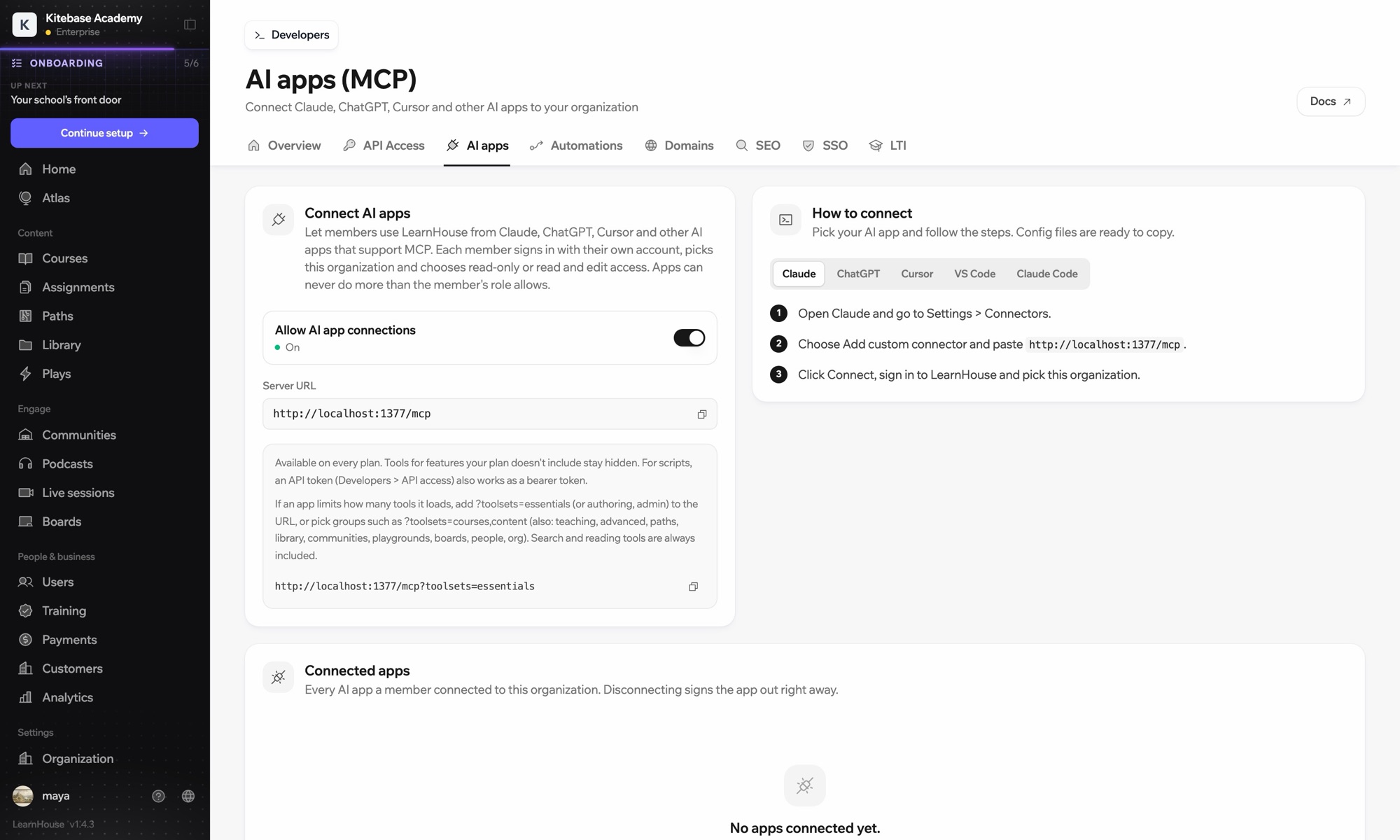
LearnHouse connects to VS Code through its MCP server, added in VS Code as an HTTP server. Once you sign in, the AI chat in VS Code can look up courses, edit lessons and read learner progress, limited to what your LearnHouse role allows.

How it connects
LearnHouse MCP server
Plan
Pro and up
Related LearnHouse page
Ask Atlas
ProLearnHouse MCP serverAI appsAutomation
What you can do

What VS Code does for you

MCP server

Keep docs and lessons in step

Ask the chat to update the lesson that explains a function you just changed in the code beside it.
01 / 3
Connect Claude or ChatGPT over MCP
Claude · LearnHouse connected
Who's stuck in Seller Bootcamp?
learnhouse · list_learners
3 learners haven't opened chapter 2 in 14 days. Want me to send them a nudge?
Yes, send it.
Setup

Set it up in minutes

  1. 1

    Add the server

    Run the command MCP: Add Server and choose HTTP.

  2. 2

    Paste the URL

    Use the server URL shown under Connect AI apps in your LearnHouse dashboard and give it a name.

  3. 3

    Sign in

    Start the server. VS Code opens LearnHouse so you can sign in and pick the organization.

Included in

Profrom $143/mo billed yearly

The API and MCP server come with Pro on LearnHouse Cloud.

Start 14-day trialCompare plans
FAQ

VS Code questions

Does VS Code need an API token?

No. It signs in through your browser. An API token also works as a bearer token if you prefer scripts.

Can it delete courses?

It can only do what your LearnHouse role allows, and you choose read-only or read and edit access when you connect.

My app loads too many tools. What can I do?

Add ?toolsets=essentials to the server URL, or name the groups you need, such as ?toolsets=courses,content.

Works well with

Claude CodeConnect Claude Code to your academy with one terminal command.CursorUse LearnHouse from Cursor and other MCP clients.AnthropicClaudeRun your academy from Claude with the LearnHouse MCP server.OpenAIChatGPTBuild and manage courses from ChatGPT through MCP.Google GeminiGoogle GeminiThe AI behind LearnHouse AI, already powering your platform.SlackSlackPost course completions and new sign-ups to Slack through the LearnHouse Zapier app.
Connect your tools in your first week

Connect your tools in your first week

Try any plan free for 14 days. No credit card, 0% platform fees, and integrations included.

Start free trial

Or self-host the open-source edition for free