LearnHouse
Get Started
LearnHouse
AIEnterpriseDevelopersMobilePricing
GitHub...
LoginGet Started

The next gen modern open source learning platform

XGitHubLinkedInDiscord

Product

  • Creators
  • Academia
  • Enterprise
  • Developers
  • Mobile app
  • Open source
  • Design
  • Discoverability
  • Pricing

Features

  • Courses
  • AI
  • Payments
  • Communities
  • Podcasts
  • Boards
  • Plays
  • Code
  • Analytics
  • Video courses
  • Newsletter
  • Live sessions
  • Learning paths
  • Drip content
  • Assignments
  • Certificates
  • Scenarios
  • Required training
  • Course translation
  • Integrations

Resources

  • Documentation
  • University
  • Blog
  • Changelog
  • Self-hosting
  • Glossary
  • GitHub
  • Compare platforms

Company

  • Contact
  • Security
  • Industries

Company

  • Contact
  • Security
  • Industries

Compare LearnHouse with

  • Udemy
  • Moodle
  • Teachable
  • Open edX
  • Thinkific
  • Canvas
  • Kajabi
  • Skool
  • Podia
  • Coursera
  • All comparisons

Alternatives to

  • Udemy
  • Teachable
  • Thinkific
  • Kajabi
  • Skool
  • Podia
  • Coursera
  • Moodle
  • Open edX
  • Canvas LMS
  • Skillshare
  • Mighty Networks
  • LearnWorlds
  • Circle
Found a bug or issue?
Open Source Initiative

Open Source

AGPLv3 licensed, self-hostable

GDPR Ready

EU data protection compliant

G2

G2

Review us on G2

© 2026 LearnHouse, Inc.

  • Privacy
  • Terms
  • Cookie Policy
All integrations

Use Microsoft Teams with LearnHouse: Live ClassesTraining on Teams, tracked like a course

Schedule a live session in LearnHouse, add your Teams meeting link, and keep reminders, attendance and the recording with the course.

Start free trial

14 days free · No credit card

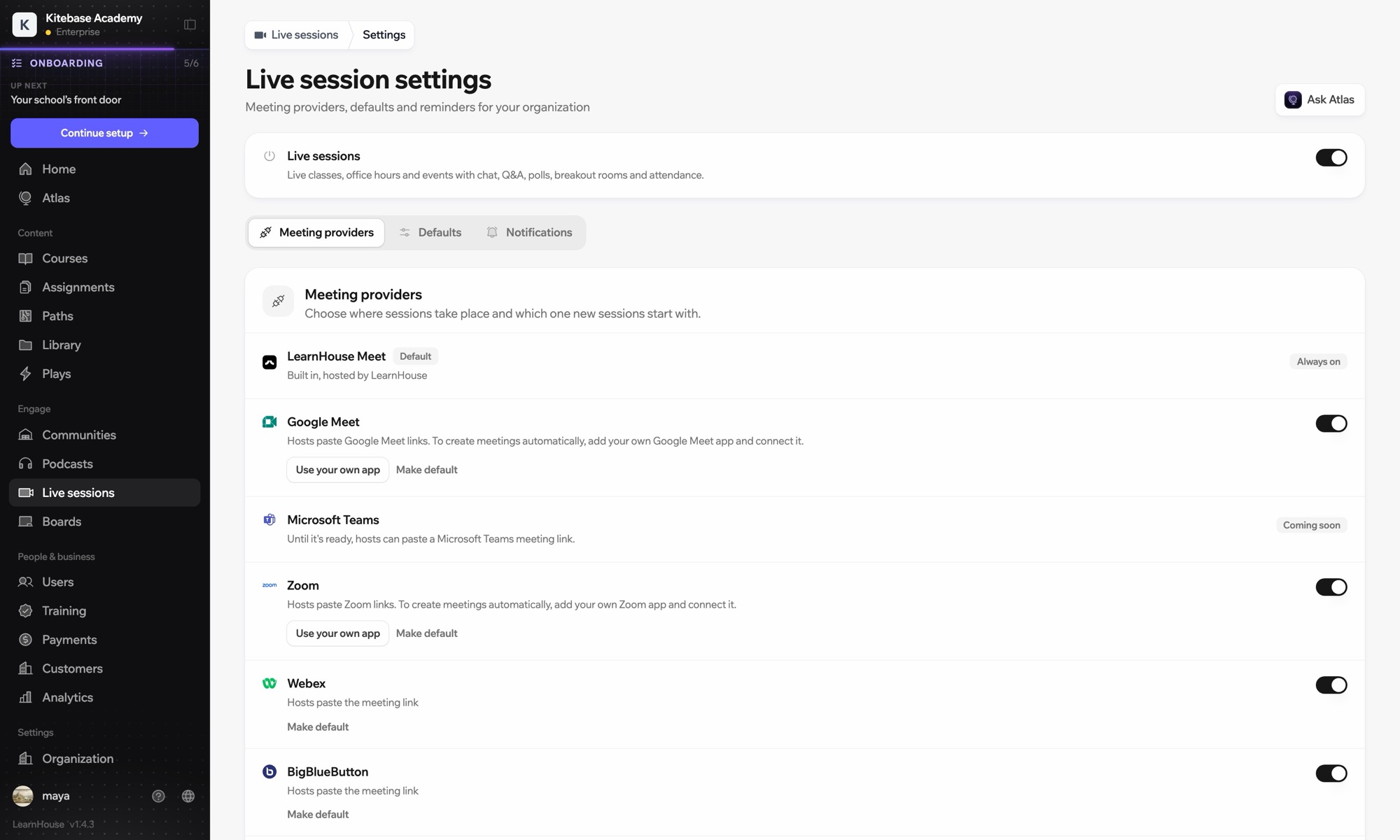
Microsoft Teams works with LearnHouse live sessions by link or through a connected Microsoft 365 account. Connected, each session is an Outlook event with a Teams meeting, and attendance reports, recordings and transcripts come back.

How it connects
Live session provider
Plan
Business and up
Related LearnHouse page
Live sessions
BusinessLive session providerLive classesCommunication
What you can do

What Microsoft Teams does for you

Live sessions

Meetings and Outlook invites made for you

Connect a Microsoft 365 account and each session becomes an Outlook event with a Teams meeting. People who RSVP get the invite.
01 / 4
Live session providers: Zoom, Google Meet, Teams
MC
LH
SP
LIVE · Office hours24 watching
AI summary of the recording
Setup

Set it up in minutes

  1. 1

    Connect Microsoft 365

    An admin opens Live sessions → Settings, adds the Microsoft app details and connects the account.

  2. 2

    Schedule a session

    Choose Microsoft Teams; LearnHouse creates the Outlook event with the Teams link.

  3. 3

    Teach

    Learners join from the session page or the invite. Chat, Q&A and polls stay on the session page.

  4. 4

    Review attendance

    Attendance, recordings and transcripts sync back after the meeting.

Included in

Businessfrom $319/mo billed yearly

Live sessions are included in Business.

Start 14-day trialCompare plans
FAQ

Microsoft Teams questions

Can hosts just paste a Teams link?

Yes. Without a connected account, paste a teams.microsoft.com link; attendance and recordings then aren't imported automatically.

Can attendees see each other on the invite?

No. Attendees are hidden from each other on the Outlook event.

Can a session move without confusing people?

Yes. Reschedules and cancellations flow through Outlook and Teams to everyone invited.

Works well with

Microsoft Entra IDSingle sign-on with Microsoft Entra ID (Azure AD) over OpenID Connect.ZoomZoomEmbed Zoom links for live classes and webinars.WebexWebexHost LearnHouse live sessions with Webex links.Google MeetGoogle MeetEmbed Google Meet links for live video sessions.BigBlueButtonBigBlueButtonRun live sessions in BigBlueButton rooms and keep the session page in LearnHouse.Outlook CalendarAdd live sessions to Outlook, or send invites from a connected Microsoft 365 calendar.
Connect your tools in your first week

Connect your tools in your first week

Try any plan free for 14 days. No credit card, 0% platform fees, and integrations included.

Start free trial

Or self-host the open-source edition for free